
Password Generator
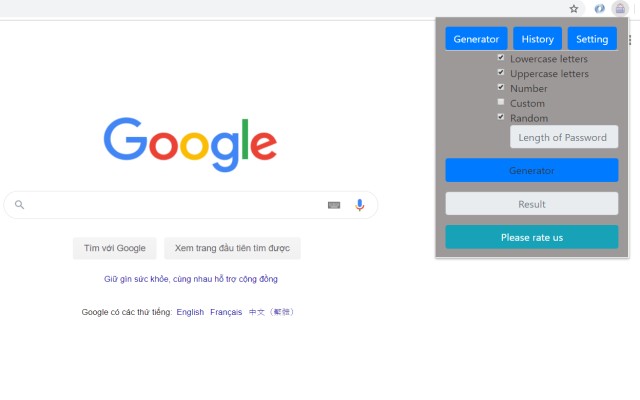
Generates secure random passwords with customizable length and character types, saving history locally.
What it does
Permissions and access
Taken from the extension's own manifest file inside the package. The store listing does not spell this out, so it is worth reading before you install.
This extension requests no browser permissions at all — unusual, and a good sign.
Requests 0 permissions — extensions doing the same job average 10.0.
Technical details
Show all 44 languages
Description
This extension provides a secure tool for generating random passwords. It helps users create strong passwords that meet specific complexity requirements, such as including uppercase and lowercase letters, numbers, and special characters. The generator is designed to save time and mental effort when signing up for online services or managing multiple accounts.
Features
- Customizable password generation: You can specify the length of the password and choose which character types to include (uppercase, lowercase, digits, symbols). This allows you to tailor the password to the requirements of any website.
- Instant generation: With a single click on the Generate button, a new secure password is created in milliseconds. This is useful when you need a password quickly without having to think of one yourself.
- History log: All generated passwords are automatically saved to a history list. This helps you keep track of passwords you've created, especially when signing up for multiple services in a session.
- One-click history clearing: You can clear the entire history with one click, providing privacy and control over stored passwords.
- No server-side storage: The extension does not have access to your generated passwords. They are generated locally on your device, ensuring that only you know the passwords.
The password generator is particularly helpful when you need to comply with strict password policies that require a mix of character types and a minimum length. By using this extension, you can generate a compliant password in seconds without the stress of inventing one. The history feature also allows you to reference recently generated passwords, which is convenient when setting up new accounts in quick succession.
Extensions that do the same job
Matched by what these extensions actually do, not by store category, and sorted so the ones asking for the least access come first.
| Extension | Site access | Permissions | Users | Rating |
|---|---|---|---|---|
| Password Generator — this page | Limited | 0 | 3K | 3.7★ |
| Signer.Digital Digital Signature, PKI | All sites | 1 | 3M | 4.2★ |
| 2FA Authenticator | All sites | 4 | 100K | 3.4★ |
| MasterPassword for chrome | Limited | 6 | 2K | 4.7★ |
| LastPass: Free Password Manager | All sites | 13 | 8M | 4.3★ |
| NordPass® Password Manager & Digital Vault | All sites | 10 | 8M | 4.6★ |
| Bitwarden Password Manager | All sites | 16 | 7M | 4.3★ |
Store data last checked August 14, 2026.