
Split Screen for Google Chrome
Organizes Chrome windows into side-by-side layouts with one click, supporting multiple monitors and custom layouts.

What it does
Permissions and access
Taken from the extension's own manifest file inside the package. The store listing does not spell this out, so it is worth reading before you install.
| Permission | What it allows |
|---|---|
contextMenus | Add items to the right-click menu |
storage | Store its own settings and data |
system.display | Read display information |
tabGroups | Manage tab groups |
Requests 4 permissions — extensions doing the same job average 4.7.
Technical details
Show all 43 languages
Keyboard shortcuts
| Shortcut | Action |
|---|---|
| Ctrl+Shift+1 | __MSG_CmdArrange1__ |
| Ctrl+Shift+2 | __MSG_CmdArrange2__ |
| Ctrl+Shift+0 | __MSG_CmdRestore__ |
Description
Split Screen for Google Chrome is a browser extension that transforms the way you manage multiple windows. Instead of manually dragging, resizing, and aligning windows, you can select a layout and the extension instantly arranges your Chrome windows into a clean, side-by-side grid. This works on a single monitor or across multiple displays, making it ideal for multitasking, research, trading, development, writing, studying, or online presentations. The extension has been completely rebuilt with a fresh interface, a visual layout editor, improved multi-monitor detection, and a more privacy-conscious permission set.
Key Features
- One-Click Layouts: Open the popup, choose a layout, and your windows snap into place-pixel-perfect, edge-to-edge, with no gaps or overlaps. This saves time compared to manual resizing and ensures a tidy workspace.
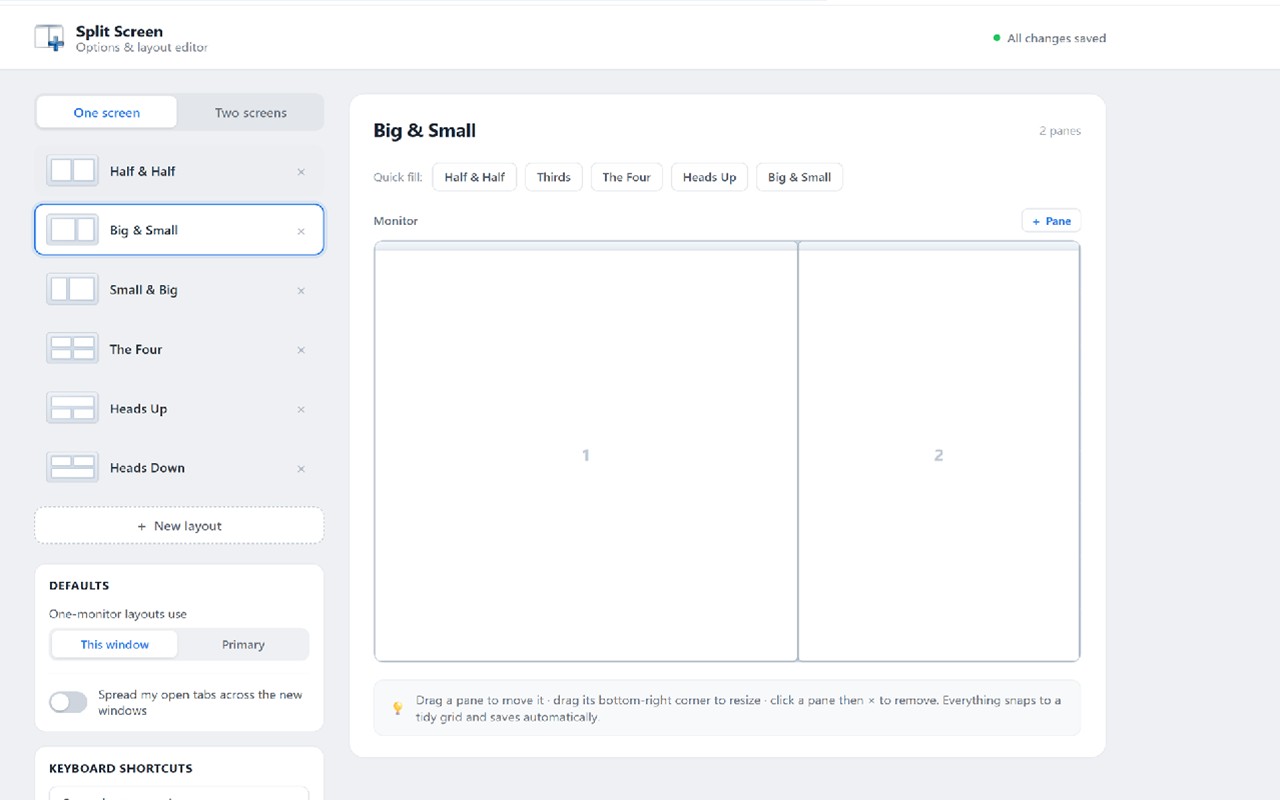
- Built-in Presets: Ready-made layouts include Half & Half, Big & Small, Small & Big, The Four, Heads Up, and Heads Down for a single screen. For dual-monitor setups, there are One & One, Four Across, Solo + Split, and Split + Solo. These presets cover common scenarios like side-by-side comparison, video watching while note-taking, or a four-window dashboard.
- Visual Layout Editor: Design your own arrangements by dragging panes to move them, resizing by dragging corners, with automatic snapping to a grid. Add or remove panes, rename layouts, and use quick-fill templates like Halves, Thirds, Quad, and Heads Up. Custom layouts appear alongside built-in ones and save automatically.
- Multi-Monitor Support: The extension reliably detects your displays and arranges windows on the screen you are actively using, preventing layouts from jumping to the primary monitor unexpectedly. Two-screen layouts span monitors as expected. The Identify Screens feature flashes a large number on each display to help you distinguish them, and the overlays close automatically.
- Spread Tabs: When enabled, the "Spread my open tabs across the new windows" option distributes the tabs from your current window into the newly arranged windows, avoiding empty New Tab pages. Pinned tabs remain in place, and tab groups are preserved with their names and colors.
- Keyboard Shortcuts: Apply your favorite layouts without opening the popup using Ctrl+Shift+1 and Ctrl+Shift+2 for your first two layouts, and Ctrl+Shift+0 to restore. All shortcuts are customizable via Chrome's keyboard settings.
- One-Click Restore: If you change your mind, Restore reverts your windows to their previous positions before the last arrangement, providing a simple undo.
- Snap a Single Window: Right-click the toolbar icon to snap the focused window to the left half, right half, top, bottom, or full screen, leaving other windows untouched.
- Target Screen Selection: For single-screen layouts, you can choose whether to use the monitor where your current window resides or always use your primary display.
- Privacy-First Design: The extension only requests permissions necessary to see your displays and move/group windows. It does not read browsing history, tab contents, or visited pages. No tracking or data collection.
This release also addresses numerous bugs reported by users, including multi-monitor layouts jumping to the wrong screen, imprecise tiling with gaps or off-screen edges across different display scaling settings, and issues with saving settings and custom layouts. The Identify-screen overlays now close reliably, and overall stability and polish have been improved. Split Screen is designed for anyone who needs to keep several windows visible at once, whether on a single monitor or multiple, and it aims to make window management effortless and efficient.
Extensions that do the same job
Matched by what these extensions actually do, not by store category, and sorted so the ones asking for the least access come first.
| Extension | Site access | Permissions | Users | Rating |
|---|---|---|---|---|
| Split Screen for Google Chrome — this page | Limited | 4 | 200K | 3.7★ |
| Open Multiple URLs | Limited | 3 | 700K | 4.7★ |
| Plugins | Limited | 3 | 400K | 3.8★ |
| Extensity | Limited | 2 | 200K | 4.8★ |
| Genie - Extemp, Congress, Debate | Limited | 3 | 20K | 4.7★ |
| ChromeTabsPlus | Limited | 3 | 1K | 3.1★ |
| Full Screen | Limited | 2 | 1K | 3.6★ |
Store data last checked August 14, 2026.