
Open Multiple URLs
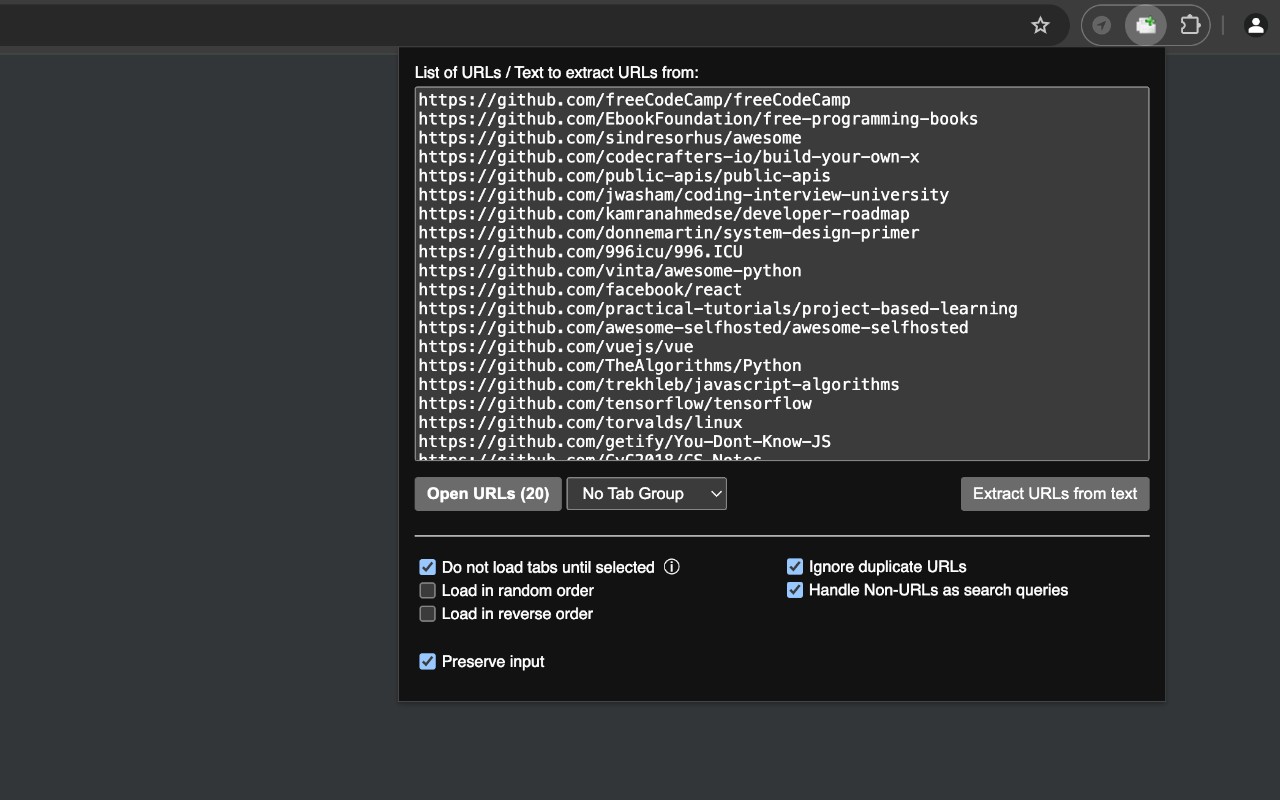
Opens a list of URLs in new tabs from pasted plain text.
What it does
Permissions and access
Taken from the extension's own manifest file inside the package. The store listing does not spell this out, so it is worth reading before you install.
| Permission | What it allows |
|---|---|
search | Run searches in your default search engine |
storage | Store its own settings and data |
tabGroups | Manage tab groups |
Requests 3 permissions — extensions doing the same job average 4.7.
Technical details
Description
Open Multiple URLs is a practical browser tool that allows you to open several web pages at once by pasting a list of URLs into a text area. Instead of manually opening each link one by one, you can paste all addresses (one per line), configure a few options, and click a button to open them all in new tabs. This extension is particularly useful for researchers, developers, or anyone who needs to quickly access multiple sites from a saved list, such as checking a set of bookmarks, verifying links, or browsing through a collection of resources.
Features
- Plain-text URL input: Paste any list of website addresses, each on a separate line. The extension processes them as-is, supporting both standard URLs and text that may need to be treated as search queries.
- Customizable opening options: Choose how URLs are opened-whether in new tabs, new windows, or in existing tab groups. This flexibility helps organize your browsing session by grouping related pages together or keeping them separate.
- Tab group support: URLs can be opened in new or existing tab groups, making it easy to categorize and manage multiple pages. For example, you can open all work-related links in one group and personal links in another.
- Search fallback: If an input line is not a valid URL, the extension can perform a standard web search using your default search engine. This is handy when you have a mix of URLs and search terms in your list.
- Settings persistence: The extension saves your preferences and previously entered lists using the browser's storage. This means your options and recent inputs are retained between sessions, so you don't have to re-enter them each time.
- Open source and transparent: The source code is available on GitHub, and there is a changelog to track updates. Users can verify the code or contribute improvements.
Whether you need to open a batch of links from a document, email, or exported bookmarks, Open Multiple URLs streamlines the process by eliminating repetitive clicking. It is a straightforward utility that saves time and reduces manual effort when dealing with multiple web addresses.
Extensions that do the same job
Matched by what these extensions actually do, not by store category, and sorted so the ones asking for the least access come first.
| Extension | Site access | Permissions | Users | Rating |
|---|---|---|---|---|
| Open Multiple URLs — this page | Limited | 3 | 700K | 4.7★ |
| Plugins | Limited | 3 | 400K | 3.8★ |
| Extensity | Limited | 2 | 200K | 4.8★ |
| Split Screen for Google Chrome | Limited | 4 | 200K | 3.7★ |
| Genie - Extemp, Congress, Debate | Limited | 3 | 20K | 4.7★ |
| ChromeTabsPlus | Limited | 3 | 1K | 3.1★ |
| Full Screen | Limited | 2 | 1K | 3.6★ |
Store data last checked August 14, 2026.