
Email Tracker + Pixelblock Detector & Blocker
Email tracking with read receipts and automatic blocking of tracking pixels for Gmail, Outlook, Office 365, and Yahoo

What it does
Permissions and access
Taken from the extension's own manifest file inside the package. The store listing does not spell this out, so it is worth reading before you install.
| Permission | What it allows |
|---|---|
alarms | Schedule background tasks |
cookies | Read and change cookies for the sites it runs on |
declarativeNetRequest | Block or modify network requests |
declarativeNetRequestFeedback | declarativeNetRequestFeedback |
declarativeNetRequestWithHostAccess | Block or modify requests on sites it can access |
gcm | Receive push messages |
notifications | Show desktop notifications |
offscreen | Run hidden pages for background work |
scripting | Run its own code on pages |
storage | Store its own settings and data |
tabs | See the addresses and titles of your open tabs |
unlimitedStorage | Store unlimited data on your computer |
webNavigation | See which pages you navigate to |
Requests 13 permissions — extensions doing the same job average 6.8.
Technical details
Description
Email Tracker + Pixelblock Detector & Blocker is a browser extension that notifies you when your emails are read and protects your privacy by blocking tracking pixels in incoming messages. With unlimited free tracking for Gmail, Outlook, Hotmail, Office 365, and Yahoo Mail, you can easily see if your emails have been opened without any limits on accounts or messages sent.
Key Features
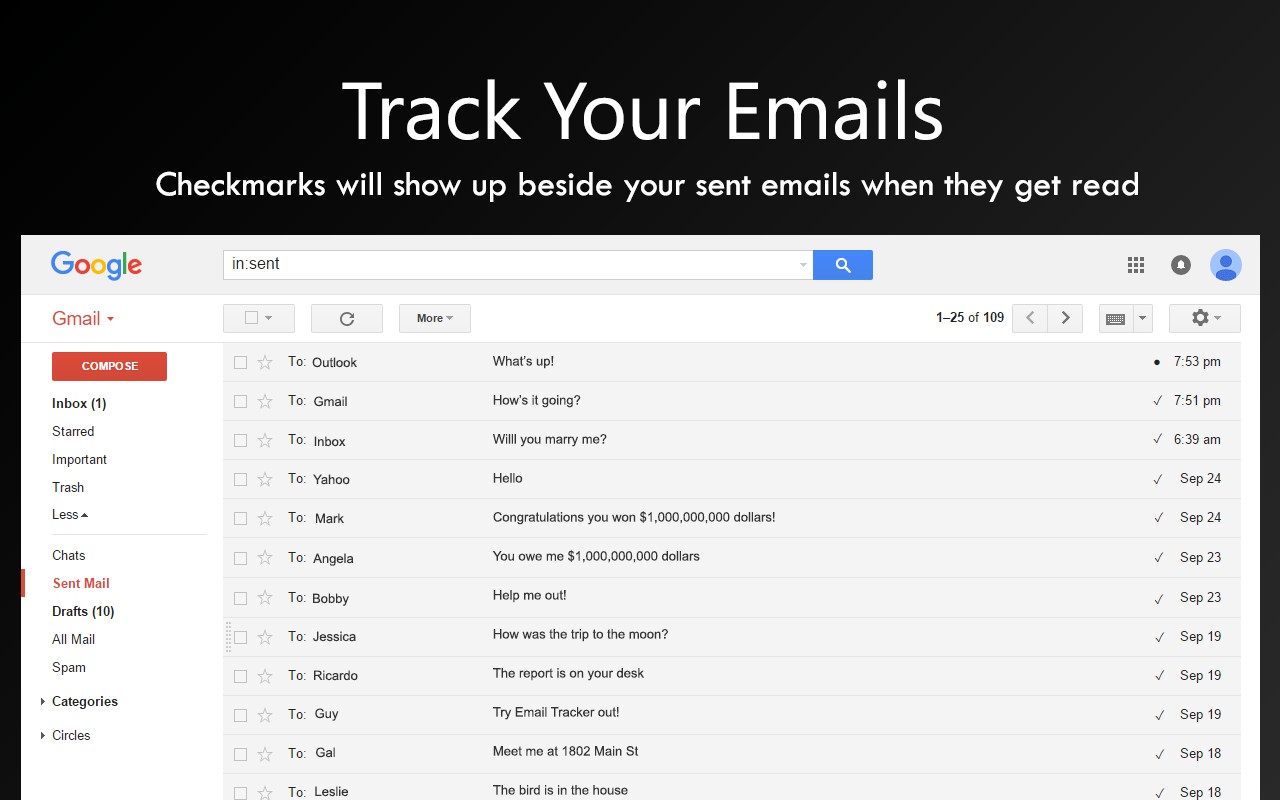
- Automatic email tracking: After installation, every email you send is automatically monitored. A small circle icon appears next to the sent message to indicate tracking is active, and a checkmark appears when the recipient opens it. This works for unlimited email accounts and sent emails, so you never have to worry about quotas or manual setup.
- Pixelblock detector and blocker: The extension detects and automatically blocks tracking pixels embedded in emails you receive. This prevents senders from knowing when you opened their messages, effectively functioning as a privacy protector similar to PixelBlock or Ugly Email. It helps you maintain control over your own reading activity.
- Cross-platform compatibility: Seamlessly works with Gmail, Outlook, Hotmail, Office 365 Outlook, and Yahoo Mail. For other email clients, you can contact the support team at [email protected] to inquire about compatibility.
- Privacy-first design: Email Tracker never stores or transfers the contents of your emails. Only metadata related to whether an email has been opened is processed, ensuring your message content remains private and secure on your device.
- Self-testing feature: Emails sent to yourself are not tracked. To test the extension, simply send an email to another email account you control. This allows you to verify functionality without affecting personal tracking data.
- Pro upgrade available: For advanced users, a paid Pro version offers full statistics, link tracking, and additional features. You can learn more and upgrade at https://emailtracker.website/pro.
- Support and help: For more information, troubleshooting, or guidance, visit https://emailtracker.website/help. The support team is available to assist with any questions.
Whether you're a professional who needs to confirm client email opens or a privacy-conscious user who wants to block unwanted tracking, Email Tracker + Pixelblock Detector & Blocker provides a straightforward, unlimited, and secure solution for both tracking and protection.
Extensions that do the same job
Matched by what these extensions actually do, not by store category, and sorted so the ones asking for the least access come first.
| Extension | Site access | Permissions | Users | Rating |
|---|---|---|---|---|
| Email Tracker + Pixelblock Detector & Blocker — this page | All sites | 13 | 300K | 4.6★ |
| Virtru Email Protection | Limited | 2 | 700K | 3.9★ |
| MEGA | Limited | 2 | 1M | 4.3★ |
| Plugins | Limited | 3 | 400K | 3.8★ |
| Docusign eSignature for Chrome | Limited | 2 | 300K | 4.3★ |
| Privacy Extension For WhatsApp Web - WABULK | Limited | 4 | 200K | 4.7★ |
| Ghostwrite: ChatGPT Email Assistant | Limited | 3 | 20K | 4.0★ |
Want the same thing with less access? Virtru Email Protection, MEGA, Plugins ask for fewer permissions than this one.
Store data last checked August 14, 2026.