
Privacy Extension For WhatsApp Web - WABULK
Locks WhatsApp Web screen with password and blurs messages, images, and profiles for privacy.
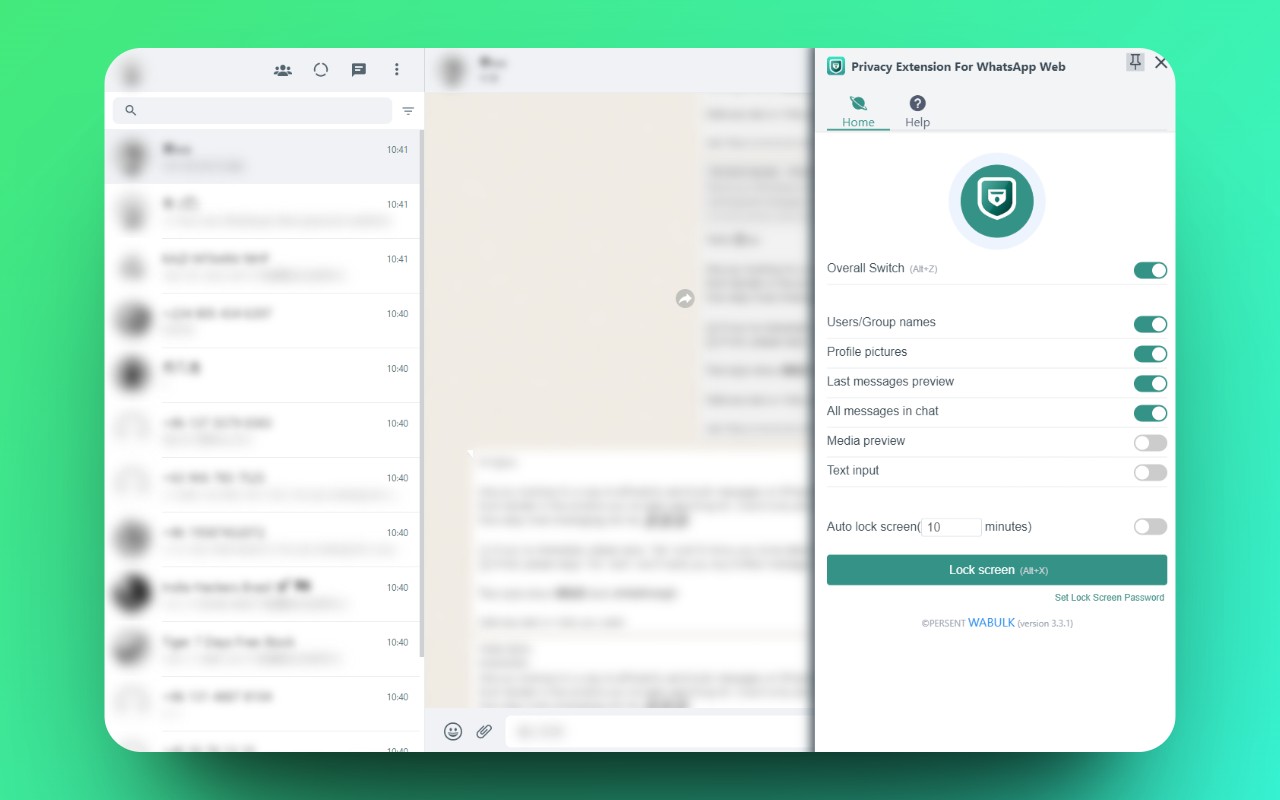
What it does
Permissions and access
Taken from the extension's own manifest file inside the package. The store listing does not spell this out, so it is worth reading before you install.
| Permission | What it allows |
|---|---|
commands | commands |
storage | Store its own settings and data |
tabs | See the addresses and titles of your open tabs |
unlimitedStorage | Store unlimited data on your computer |
Requests 4 permissions — extensions doing the same job average 6.9.
Technical details
Show all 54 languages
Keyboard shortcuts
| Shortcut | Action |
|---|---|
| Alt+Z | Overall switch |
| Alt+X | Lock screen switch |
Description
Privacy Extension For WhatsApp Web - WABULK helps you protect your conversations on WhatsApp Web by adding an extra layer of security and discretion. Whether you're working in a shared office, using a public computer, or simply want to keep your chats private from people nearby, this extension gives you control over what is visible on your screen. It offers a screen lock feature that requires a password to access WhatsApp Web, and it lets you selectively blur sensitive content such as messages, images, profile pictures, and more. This way, you can prevent unauthorized access when you step away from your computer, and you can avoid prying eyes seeing your private conversations while you're actively using WhatsApp Web.
Features
- Screen Lock: The screen lock feature adds a password requirement to access WhatsApp Web. When activated, you must enter the password to view or interact with your chats. You can also set a time limit for automatic lock screen activation, so after a period of inactivity, the screen locks itself. This is useful when you forget to lock manually or if you need to step away unexpectedly. The lock screen ensures that even if someone accesses your computer, they cannot see your WhatsApp Web content without the password.
- Message Hiding with Blur: The hidden chat messages feature lets you blur specific parts of the WhatsApp Web interface. You can independently toggle blur for: Users/Group Names, Profile Pictures, Last Message Preview, All Messages in Chat, Media Preview, and Text Input. When blur is enabled, the content is obscured until you hover your mouse over it, at which point it becomes clear. This allows you to keep your screen mostly private while still being able to view content when needed. For example, you might want to blur all messages in a chat to prevent someone from reading over your shoulder, but still see the names of contacts to navigate easily.
- Keyboard Shortcuts for Quick Toggle: You can turn the screen lock on or off with the shortcut Alt+X. The overall toggle for hidden chat messages (enabling or disabling all blur effects at once) is Alt+Z. These shortcuts make it fast and convenient to switch between private and normal viewing modes without navigating menus. You can also customize these shortcuts in Chrome's extension shortcuts settings (chrome://extensions/shortcuts) to suit your preferences. For instance, if you frequently need to quickly hide all sensitive content when someone approaches, you can press Alt+Z instantly.
Overall, Privacy Extension For WhatsApp Web - WABULK gives you practical tools to maintain your privacy on WhatsApp Web in various real-world scenarios. Whether you're in a co-working space, a library, or at home with family, you can tailor the level of privacy to your needs. The extension is straightforward to use, with clear toggles and customizable shortcuts, making it a reliable companion for anyone who values their chat privacy.
Extensions that do the same job
Matched by what these extensions actually do, not by store category, and sorted so the ones asking for the least access come first.
| Extension | Site access | Permissions | Users | Rating |
|---|---|---|---|---|
| Privacy Extension For WhatsApp Web - WABULK — this page | Limited | 4 | 200K | 4.7★ |
| MEGA | Limited | 2 | 1M | 4.3★ |
| Virtru Email Protection | Limited | 2 | 700K | 3.9★ |
| Plugins | Limited | 3 | 400K | 3.8★ |
| Osprey: Browser Protection | Limited | 3 | 10K | 4.9★ |
| Just Delete Me | Limited | 4 | 8K | 4.3★ |
| WA Blur: Hide Whatsapp™ chats by blurring | Limited | 1 | 6K | 3.0★ |
Store data last checked August 14, 2026.