
Paper To Audio
Converts academic paper text into speech via section selection or text highlighting.
What it does
Permissions and access
Taken from the extension's own manifest file inside the package. The store listing does not spell this out, so it is worth reading before you install.
| Permission | What it allows |
|---|---|
contextMenus | Add items to the right-click menu |
storage | Store its own settings and data |
Requests 2 permissions — extensions doing the same job average 4.7.
Technical details
Description
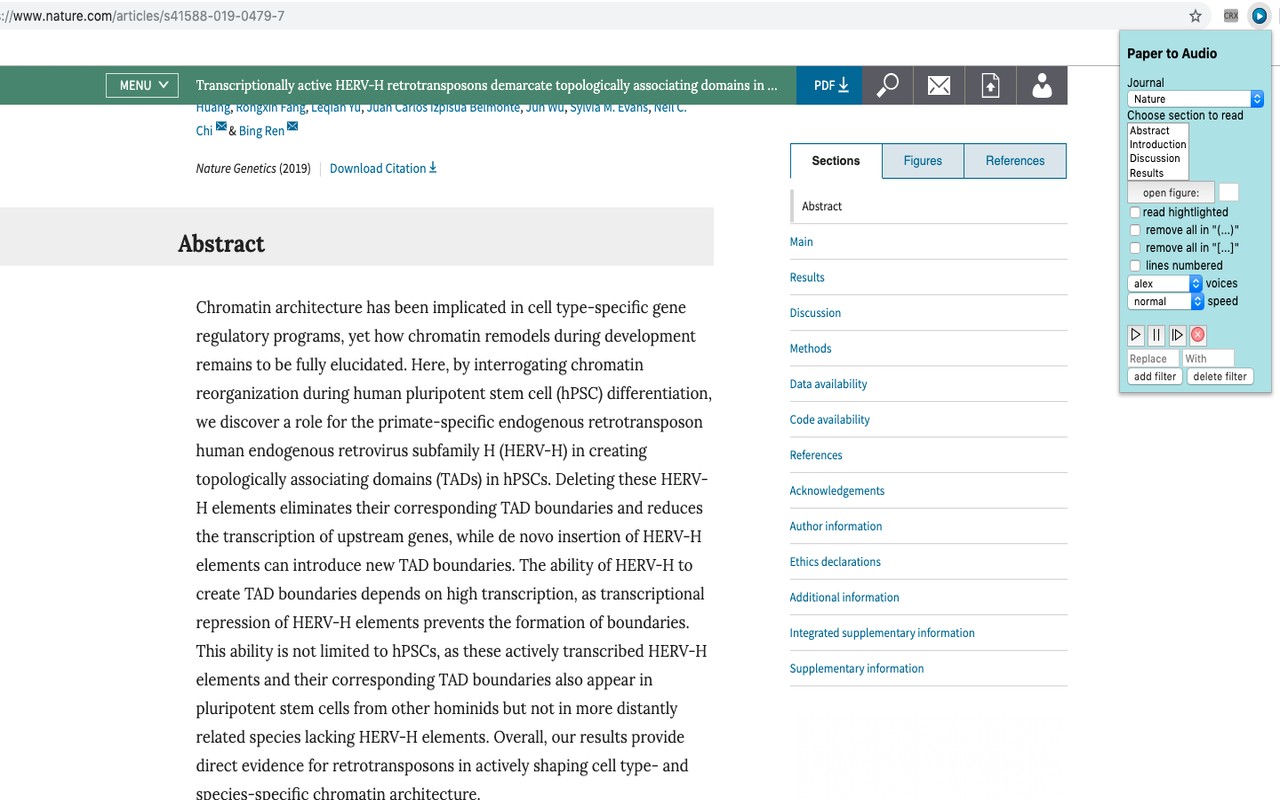
Paper To Audio is a Chrome extension designed to convert academic paper text into spoken audio, offering a hands-free way to consume research articles. It is particularly useful for researchers, students, or professionals who need to review multiple papers and prefer listening over reading, or who want to multitask while studying. The extension integrates directly with the browser, allowing you to use it on any academic journal page without switching between applications.
Key Features
- Select Text or Sections: You can either highlight any text on the page with your mouse or choose a predefined section (such as Abstract, Introduction, Results, etc.) from a dropdown menu. This flexibility lets you listen to a specific part of a paper or the entire article.
- Playback Controls: Dedicated play and pause buttons let you start or pause the speech at any time. When you are done listening, you must click the cancel (X) button to stop the speech entirely, ensuring that you can move on to other content without background audio.
- Speed and Voice Options: Adjust the reading speed to match your preference, and select from available voice options to customize the listening experience. This is helpful when you want to skim quickly or listen more slowly for comprehension.
- Rewind and Fast Forward: Use the rewind and fast-forward icons to jump backward or forward in the audio. Additionally, you can navigate by paragraphs using the up and down arrows; the number of paragraphs to skip or rewind can be set in the adjacent text box. Note that these navigation features work only when reading by sections, not when reading highlighted text.
- Read Highlighted Text: To listen to text you select with the mouse, ensure the "read highlighted" checkbox is checked. This feature also works in Google Docs. For PDF documents, you need to highlight the text, right-click, and choose the "read" option from the context menu.
- Reference Removal: The extension automatically removes citations and references from the text before reading, based on the journal you select (Cell, Nature, Science, etc.). For example, in Cell style, citations like (Williams et al., 2019) are stripped, leaving only the sentence. This prevents the speech from being interrupted by parenthetical references.
- Custom Filtering: If you want to remove all text within parentheses (round or square), you can enable the "remove all in '(..)'" or "remove all in '[..]'" checkboxes. This is useful for papers with extensive citations or notes.
- Text Replacement: To correct mispronunciations or prevent unwanted omissions caused by the reference style, you can use the "Replace" and "With" text boxes. Enter the text you want to correct in "Replace" and the desired replacement in "With". Use the "Add" and "Delete filter" buttons to manage multiple replacement rules. The extension supports JavaScript regular expressions for advanced replacements.
Before using the extension, install it and refresh all open Chrome tabs. Then navigate to an academic journal page, select or highlight the text you want to hear, and press play. The extension is not guaranteed to work on all computers, so it is recommended to test it on your system before making any donation. A full tutorial is available at the provided YouTube link.
Extensions that do the same job
Matched by what these extensions actually do, not by store category, and sorted so the ones asking for the least access come first.
| Extension | Site access | Permissions | Users | Rating |
|---|---|---|---|---|
| Paper To Audio — this page | All sites | 2 | 1K | 4.1★ |
| Talkie: text-to-speech (TTS) | Limited | 5 | 30K | 3.6★ |
| Gemini Reader: Free AI Text to Speech with Google Voices, TTS | Limited | 5 | 3K | 4.2★ |
| Markdown Reader | Limited | 2 | 100K | 4.7★ |
| Testing Reading Speed | Limited | 3 | 3K | 4.3★ |
| SAP Addon | Limited | 2 | 2K | 5.0★ |
| Templify - write messages in 1 click! 🚀 | Limited | 4 | 2K | 4.8★ |
Want the same thing with less access? Markdown Reader, Testing Reading Speed, SAP Addon ask for fewer permissions than this one.
Store data last checked August 16, 2026.