
Templify - write messages in 1 click! 🚀
Create and insert reusable message templates on any website with Templify.
What it does
Permissions and access
Taken from the extension's own manifest file inside the package. The store listing does not spell this out, so it is worth reading before you install.
| Permission | What it allows |
|---|---|
activeTab | Access the current tab when you click the extension |
clipboardRead | Read what you copy |
scripting | Run its own code on pages |
sidePanel | Show a panel beside the page |
Asks for these only when you use the matching feature:
tabs
Requests 4 permissions — extensions doing the same job average 5.3.
Technical details
Show all 33 languages
Keyboard shortcuts
| Shortcut | Action |
|---|---|
| Ctrl+Shift+Space | __MSG_extension_shortcuts_execute_action__ |
Description
Templify is a browser extension that lets you create reusable message templates and insert them on any website, platform, or service. Designed for professionals who send frequent, repetitive messages, it eliminates the need to type the same text over and over. With over 2,000 active users and consistent 5-star reviews, Templify is a proven productivity tool for small businesses, customer service teams, recruiters, salespeople, and anyone who communicates online regularly.
Key Features
- Works Everywhere: Templify functions on any website, including Gmail, LinkedIn, Slack, Amazon Seller Central, Zendesk, Shopify, ChatGPT, and thousands more. There are no platform restrictions, so you can use the same templates across all your tools without switching apps.
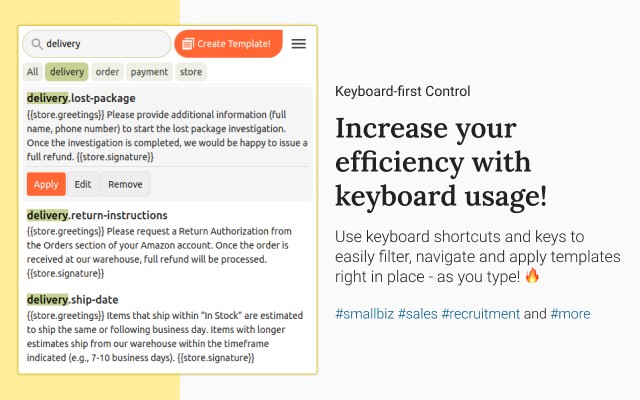
- Easy to Use: Create, browse, and apply templates directly from a popup panel or context menu. No shortcuts to memorize or external applications needed. You can access your templates exactly when and where you need them, right in the browser.
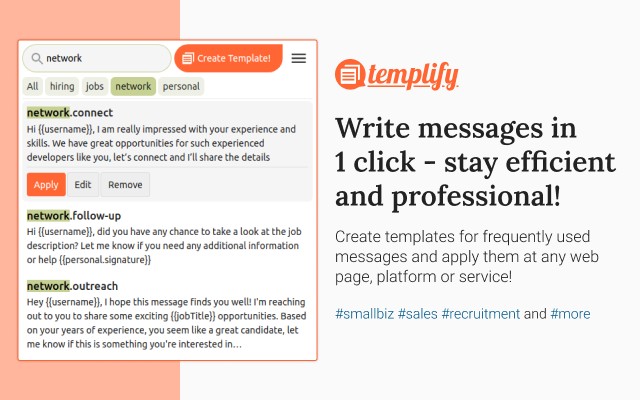
- Smart Syntax: Insert dynamic placeholders like first name, company, or custom fields to personalize messages automatically. This is especially useful for recruiters sending connection requests or sales reps crafting outreach emails, as it increases engagement without manual editing.
- Template Groups: Organize templates into folders or groups for easy navigation. For example, a customer support agent might have groups for refunds, shipping, and product inquiries, while a recruiter may separate templates for LinkedIn messages and email pitches. Team Workspaces: Share template collections with your team. Everyone can access the same set of approved responses, ensuring consistent brand voice and accurate information across customer interactions. Ideal for support teams or sales departments.
- Lightning-Fast Keyboard Controls: Assign keyboard shortcuts to your most-used templates and insert them with a few keystrokes. This speeds up repetitive tasks like sending order confirmations or answering FAQs.
- Privacy-First Design: Templify requests only the permissions it needs to function. It does not collect personal data or read your browsing history unnecessarily, following best practices for user privacy.
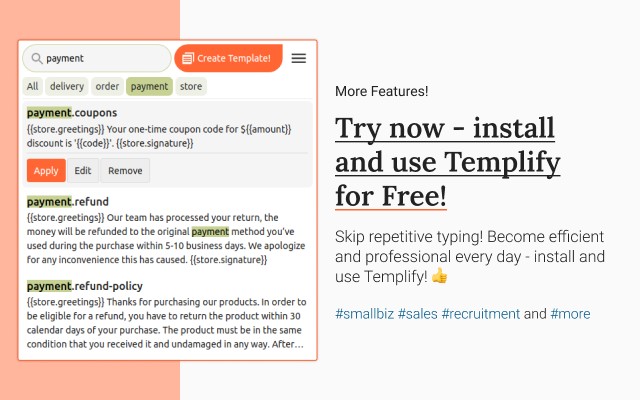
Use Templify to streamline communication across a wide range of scenarios. For example, customer service teams can create templates for order status updates, return instructions, or payment issues and apply them on Amazon, eBay, or Shopify. Recruiters can build templates for connection requests, interview invitations, and job descriptions, using smart syntax to personalize each message on LinkedIn or via web messengers. Sales professionals can craft templates for every stage of the funnel-from initial outreach to follow-ups-and use them on LinkedIn, X (formerly Twitter), or Facebook. Templify is also popular for storing AI prompts, such as those for ChatGPT, Midjourney, or Notion AI, making it easy to reuse effective queries. Whether you need canned responses for Gmail, quick replies for Slack, or email snippets for HubSpot, Templify integrates seamlessly into your workflow. Get started for free with no credit card required and save time for what truly matters.
Extensions that do the same job
Matched by what these extensions actually do, not by store category, and sorted so the ones asking for the least access come first.
| Extension | Site access | Permissions | Users | Rating |
|---|---|---|---|---|
| Templify - write messages in 1 click! 🚀 — this page | Limited | 4 | 2K | 4.8★ |
| Ghostwrite: ChatGPT Email Assistant | Limited | 3 | 20K | 4.0★ |
| Gemini Reader: Free AI Text to Speech with Google Voices, TTS | Limited | 5 | 3K | 4.2★ |
| Record Voice Messages in Gmail - Beep | Limited | 3 | 3K | 4.9★ |
| Bardeen: Automate Browser Apps with AI | All sites | 13 | 200K | 4.4★ |
| Canned Responses & Company Wiki - Klutch | All sites | 5 | 3K | 4.7★ |
| WProofreader: AI grammar check & rewrite tool | All sites | 6 | 3K | 3.9★ |
Store data last checked August 14, 2026.