
EasySubs - Learn languages by watching films and series
Customizable subtitles and popup dictionary for language learning on YouTube, Netflix, and more.

What it does
Permissions and access
Taken from the extension's own manifest file inside the package. The store listing does not spell this out, so it is worth reading before you install.
| Permission | What it allows |
|---|---|
activeTab | Access the current tab when you click the extension |
scripting | Run its own code on pages |
storage | Store its own settings and data |
Requests 3 permissions — extensions doing the same job average 4.2.
Technical details
Show all 36 languages
Description
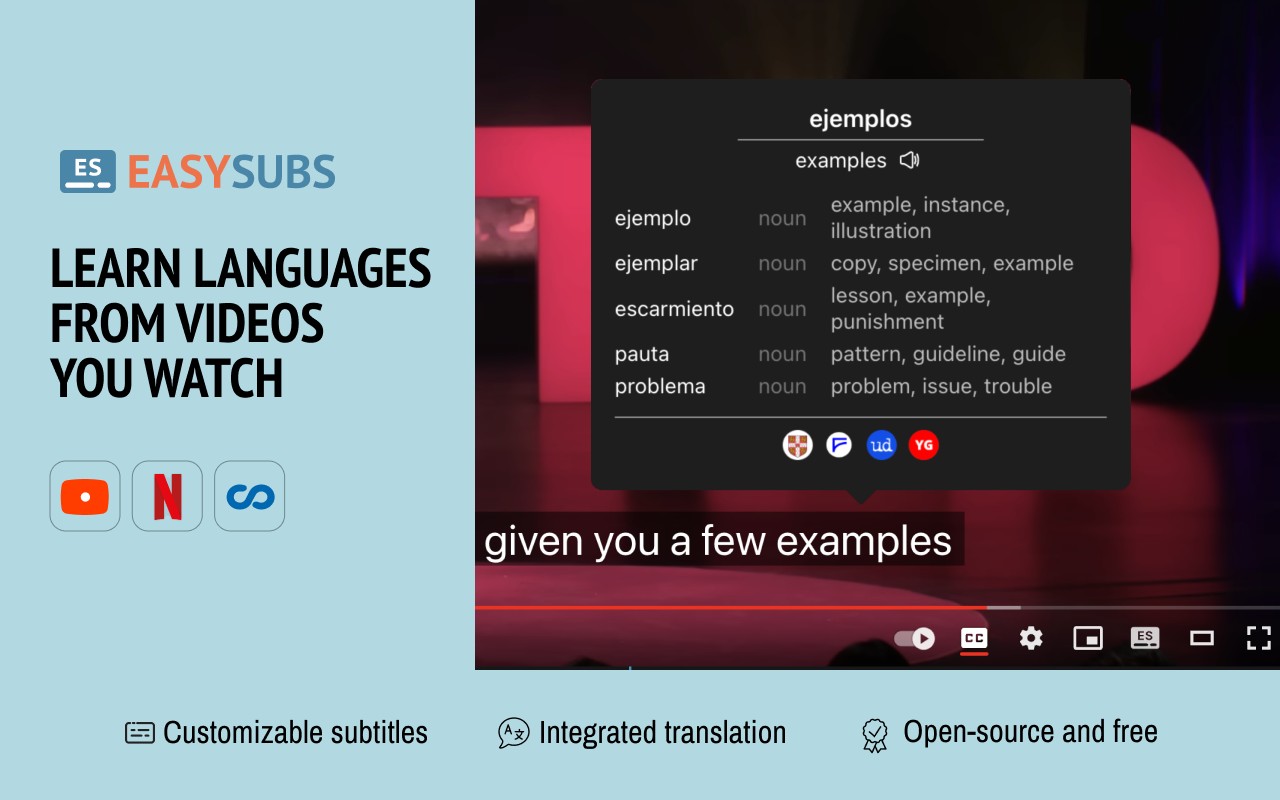
EasySubs is a free, open-source Chrome extension designed to help you learn languages by watching films and series on popular streaming platforms. It provides customizable subtitles and a popup dictionary that make it easy to translate unfamiliar words and phrases without interrupting your viewing experience. Whether you're watching YouTube, Netflix, Coursera, or KinoPub, EasySubs integrates seamlessly to turn passive entertainment into active language practice.
Key Features
- Translation on Hover or Click: Hover over any subtitle word to see its translation instantly, or click on a phrase to get a full-sentence translation. This allows you to understand context without leaving the video.
- Word Pronunciation: Hear the correct pronunciation of translated words to improve your listening comprehension and speaking skills. This is especially useful for mastering intonation and accent.
- Vocabulary Export: Save translated words and export them to popular language learning services like Anki, LinguaLeo, and Puzzle English. This helps you build a personalized vocabulary list for spaced repetition practice.
- Upload Your Own Subtitles: If you have subtitle files in your native language, you can upload them in .SRT or .VTT format. The extension will display them alongside the video, and you can manually adjust the timing if they are out of sync.
- Smart Auto-Pause: When you hover over a word, the video automatically pauses, giving you time to read the translation and pronunciation without missing the next scene. This feature makes it easy to study at your own pace.
- Subtitle Progress Bar: A visual timeline of subtitles appears below the video. You can click on any subtitle to rewind the video to that exact point, making it simple to review a specific line or scene.
- Manual Subtitle Sync: If the uploaded subtitles are not aligned with the audio, you can adjust their timing forward or backward until they match perfectly. This ensures a smooth viewing experience.
- Rewind and Fast-Forward by Subtitles: Use the right arrow key to replay the last sentence, allowing you to hear it again without manually scrubbing the video. This is great for practicing listening comprehension.
- Show All Available Subtitles: On Netflix, EasySubs can display all subtitle and audio tracks regardless of your region, giving you access to a wider range of language options.
- Multi-Platform Support: Works on YouTube (including originals), Netflix, Coursera, and KinoPub. More platforms may be added in the future, but availability depends on your region and subscription status (e.g., Netflix requires an active account).
EasySubs is completely free with no ads or hidden costs. It is open-source, meaning anyone can contribute to its development on GitHub. For questions, feedback, or support, you can email the team or join the Telegram community. If you find the extension useful, leaving a positive review helps others discover it.
Extensions that do the same job
Matched by what these extensions actually do, not by store category, and sorted so the ones asking for the least access come first.
| Extension | Site access | Permissions | Users | Rating |
|---|---|---|---|---|
| EasySubs - Learn languages by watching films and series — this page | Limited | 3 | 4K | 4.3★ |
| Subtitles for Language Learning (Prime Video) | Limited | 3 | 100K | 3.8★ |
| Learn languages with Netflix & YouTube | All sites | 4 | 8K | 3.8★ |
| Mate Translate - translator, dictionary | All sites | 4 | 400K | 4.3★ |
| Ddict: AI Translation & Writing Assistant | All sites | 4 | 100K | 4.2★ |
| Vocab by Preply | All sites | 2 | 3K | 4.1★ |
| azVocab Dictionary | All sites | 1 | 1K | 5.0★ |
Store data last checked August 14, 2026.