
Subtitles for Language Learning (Prime Video)
Adds multilingual subtitles and dictionary functions to Amazon Prime Video for language learning.
What it does
Permissions and access
Taken from the extension's own manifest file inside the package. The store listing does not spell this out, so it is worth reading before you install.
| Permission | What it allows |
|---|---|
background | Keep running in the background |
storage | Store its own settings and data |
unlimitedStorage | Store unlimited data on your computer |
Requests 3 permissions — extensions doing the same job average 4.2.
Technical details
Show all 15 languages
Description
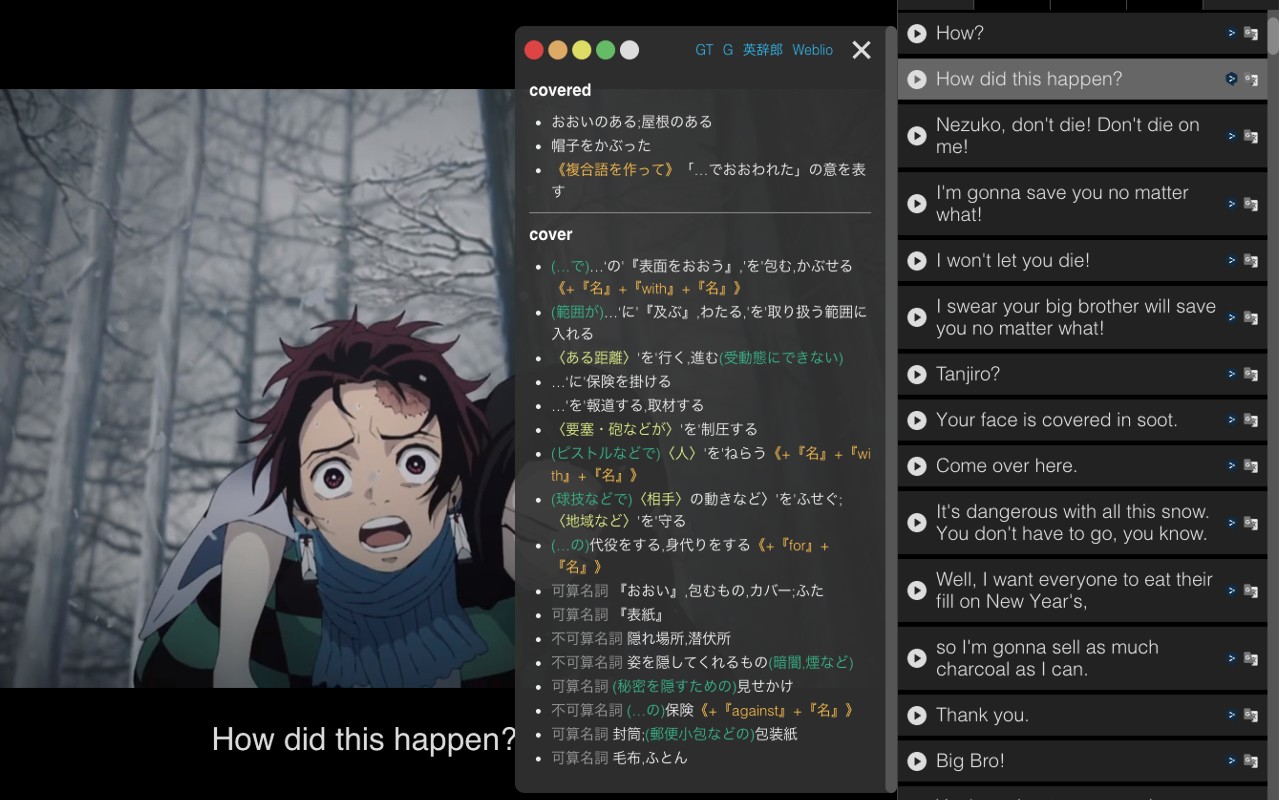
This extension enriches your language learning experience on Amazon Prime Video by adding foreign language subtitles and integrated dictionary features. It supports 79 languages, allowing you to display subtitles in your target language while watching movies, TV shows, or anime. Even when official Amazon subtitles are unavailable, the extension can search for and load subtitles from OpenSubtitles.org or from local files on your device.
Key Features
- Multilingual Subtitle Display: Choose from 79 languages to display subtitles alongside the video. This helps you associate spoken dialogue with written text in the language you are learning.
- External Subtitle Loading: When Amazon does not provide subtitles for your desired language, the extension automatically searches OpenSubtitles.org for community-uploaded subtitles. You can also upload subtitle files (e.g., .srt) from your computer.
- Mouse-Over Dictionary: Hover your mouse over any word in the subtitles to see its translation or definition in 79 languages. This instant lookup eliminates the need to pause and search manually, making it ideal for building vocabulary while watching.
- Character Selection Dictionary: Select individual characters or phrases within the subtitles to get detailed dictionary information. Useful for understanding complex terms or idioms in context.
- Word Click Dictionary Link: Click on any word in the subtitles to open a dedicated dictionary website with its definition. This provides deeper explanations and usage examples.
- Playback Position Navigation: Quickly jump to a specific subtitle line by clicking the button displayed to the left of the subtitles, or use keyboard shortcuts 'E' (back) and 'D' (forward). This helps you replay and practice difficult sentences.
- Google Translate Integration: Translate an entire subtitle sentence using Google Translate with a single click. This is useful when you need a full sentence translation to understand context.
- Playback Speed Control: Adjust video playback speed using shortcut keys 'S' (slower) and 'F' (faster). Slow down fast dialogue to catch every word, or speed up slower sections.
- Video Adjustments: Modify brightness, saturation, and contrast of the video to improve subtitle readability or adapt to lighting conditions.
- Subtitle Viewer Toggle: Open or close a dedicated subtitle viewer panel that displays subtitles separately from the video, allowing you to focus on text without visual distractions.
All features are designed to work seamlessly within the Amazon Prime Video interface, providing a smooth and uninterrupted learning experience. The extension is updated regularly to fix bugs and improve compatibility.
Extensions that do the same job
Matched by what these extensions actually do, not by store category, and sorted so the ones asking for the least access come first.
| Extension | Site access | Permissions | Users | Rating |
|---|---|---|---|---|
| Subtitles for Language Learning (Prime Video) — this page | Limited | 3 | 100K | 3.8★ |
| EasySubs - Learn languages by watching films and series | Limited | 3 | 4K | 4.3★ |
| Learn languages with Netflix & YouTube | All sites | 4 | 8K | 3.8★ |
| Mate Translate - translator, dictionary | All sites | 4 | 400K | 4.3★ |
| Ddict: AI Translation & Writing Assistant | All sites | 4 | 100K | 4.2★ |
| Vocab by Preply | All sites | 2 | 3K | 4.1★ |
| azVocab Dictionary | All sites | 1 | 1K | 5.0★ |
Store data last checked August 14, 2026.