
Recent Bookmarks Popup
Lists recent bookmarks in a toolbar popup with folder names and options to archive or delete.
Description
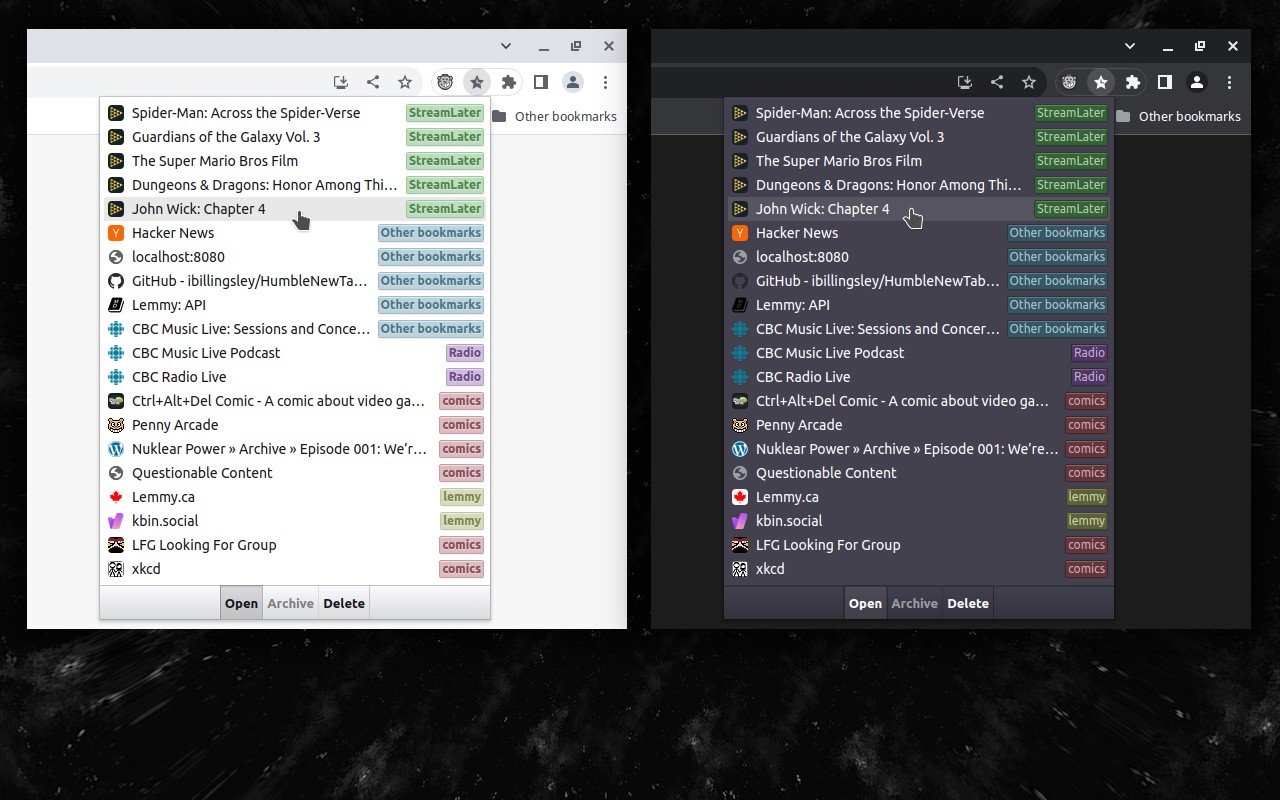
Recent Bookmarks Popup adds a toolbar button that, when clicked, displays a dropdown list of your most recently added bookmarks. Each entry shows the bookmark's title and the name of its parent folder, making it easy to identify where the bookmark is stored. The list is sorted chronologically, with the newest bookmarks appearing at the top. This is useful when you frequently add bookmarks and need quick access to the latest ones without navigating through the bookmark manager.
Features
- Quick access to recent bookmarks: Click the toolbar icon to see a sorted list of your most recent bookmarks. Each bookmark displays its parent folder name for context.
- Archive and delete actions: At the bottom of the popup, two buttons allow you to move a selected bookmark to an "Archive" folder (which you can create manually) or delete it directly. This helps you organize or remove bookmarks without opening the bookmark manager.
- Customizable display options: In the options page, you can enable or disable grouping bookmarks by date (e.g., "Today", "Yesterday", "Older") for better visual organization. You can also hide the bottom toolbar that contains the archive and delete buttons if you prefer a simpler view.
- Lightweight and straightforward: The extension focuses solely on listing recent bookmarks with minimal UI, making it fast and unobtrusive.
Use cases include quickly retrieving a bookmark you just saved, cleaning up recently added bookmarks by archiving or deleting them, and organizing bookmarks by date to see what you've saved recently. The extension is open source and available on GitHub.
Related


