
Save image as Type
Converts and downloads any web image as jpg, png, pdf, webp or gif directly from Chrome's right-click menu.
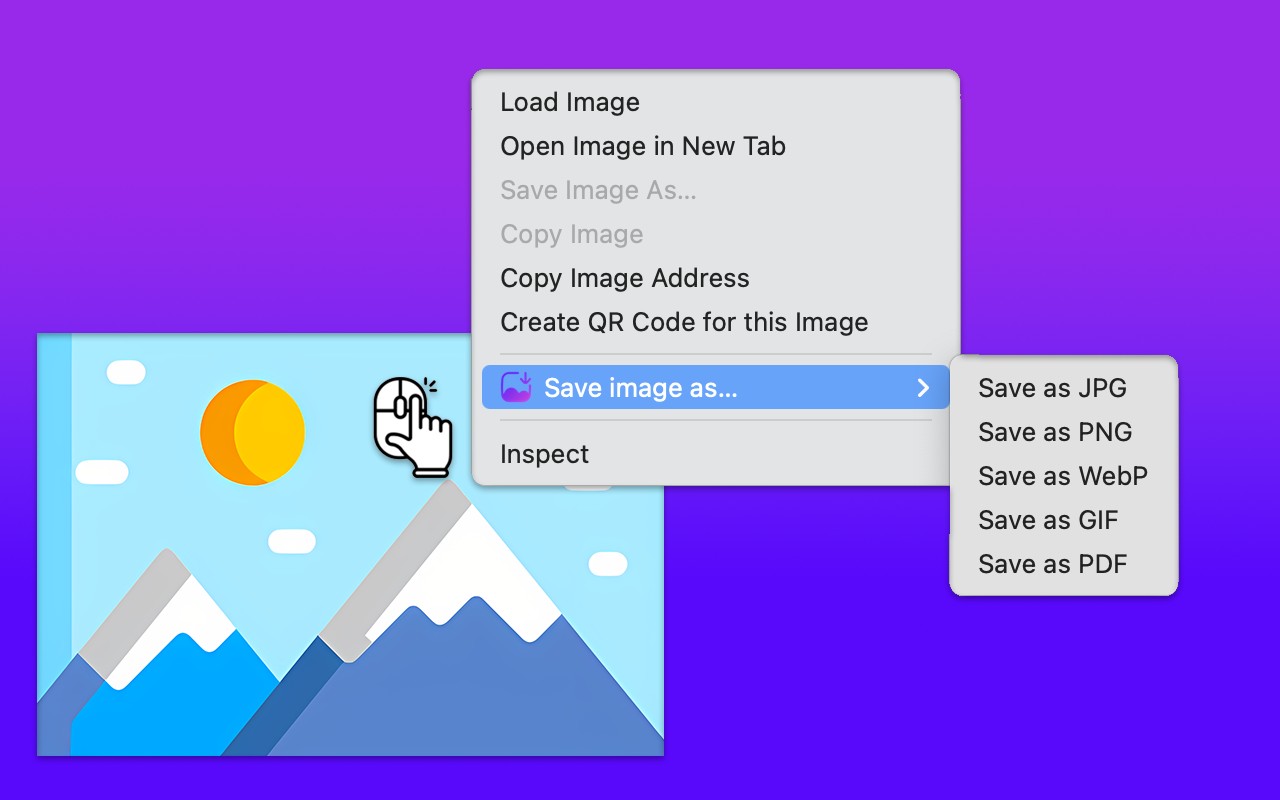
What it does
Is Save image as Type safe?
No analytics, no remote code and no obfuscation found in the code.
Web addresses written in the code:
chromewebstore.google.com, docs.google.com, fonts.googleapis.com, github.com, proext.tilda.ws
Automatic scan of the code in version 1.1.3. It shows what is written in the code; it does not run the extension.
Permissions and access
Taken from the extension's own manifest file inside the package. The store listing does not spell this out, so it is worth reading before you install.
| Permission | What it allows |
|---|---|
contextMenus | Add items to the right-click menu |
downloads | Manage your downloads |
offscreen | Run hidden pages for background work |
scripting | Run its own code on pages |
storage | Store its own settings and data |
Requests 5 permissions. Extensions doing the same job average 5.0.
Technical details
Show all 52 languages
Source code
Version 1.1.3, as published in the store. 72 files in the package.
- messages.json
- messages.json
- messages.json
- messages.json
- messages.json
- messages.json
- messages.json
- messages.json
- messages.json
- messages.json
- messages.json
- messages.json
- messages.json
- messages.json
- messages.json
- messages.json
- messages.json
- messages.json
- messages.json
- messages.json
- messages.json
- messages.json
- messages.json
- messages.json
- messages.json
- messages.json
- messages.json
- messages.json
- messages.json
- messages.json
- messages.json
- messages.json
- messages.json
- messages.json
- messages.json
- messages.json
- messages.json
- messages.json
- messages.json
- messages.json
- messages.json
- messages.json
- messages.json
- messages.json
- messages.json
- messages.json
- messages.json
- messages.json
- messages.json
- messages.json
- messages.json
- messages.json
- 128x128.png
- 16x16.png
- 48x48.png
- 64x64.png
- 96x96-128x128.png
- icon.svg
- right-click.png
- gif-encoder.js
- pdf-lib.min.js
- popup.css
- popup.html
- popup.js
- review.html
- review.js
- background.js
- manifest.json
- offscreen.html
- offscreen.js
- options.html
- options.js

{
  "update_url": "https://clients2.google.com/service/update2/crx",
  "manifest_version": 3,
  "name": "__MSG_appName__",
  "description": "__MSG_appDesc__",
  "version": "1.1.3",
  "default_locale": "en",
  "options_ui": {
    "page": "options.html",
    "open_in_tab": true
  },
  "permissions": [
    "downloads",
    "contextMenus",
    "offscreen",
    "scripting",
    "storage"
  ],
  "host_permissions": [
    "<all_urls>"
  ],
  "background": {
    "service_worker": "background.js",
    "type": "module"
  },
  "action": {
    "default_popup": "popup/popup.html"
  },
  "icons": {
    "16": "/images/16x16.png",
    "48": "/images/48x48.png",
    "64": "/images/64x64.png",
    "96": "/images/96x96-128x128.png",
    "128": "/images/128x128.png"
  }
}
Description
Save image as Type adds an image converter directly to Chrome's right-click menu. When you find a picture on a web page and need it in a different file format, you right-click that image, hover over the "Save image as" entry, and pick the output type from a submenu. The extension converts the picture and saves it to your device right away, so you never have to leave the page or open a separate conversion tool.
Full description on Chrome Web Store
Latest reviews on Chrome Web Store
Pretty good
Very handy!
Works good, simple.
Best tool!! I was facing the issue a lot. thank god it's a time saver
Very Handy Tool
Amazing extension!
Amazinggggggg!!!! love this tool
Saves images just like it states but requires browser permissions that you really shouldn't provide to it. Plus, every photo you download, will save as some multiple hex charater name with dashes instead of the default, real name. If that doesn't matter to you, then try it out. But I will search for another extension. Further observations: (Most likely it NEEDS 'Full a\Access' permission to fulfill its primary purpose.) Downloads directly to your default folder. NO "Save As" dialog ... …
works
Good work. Very handy tool
Reviews are quoted from Chrome Web Store. All reviews
Extensions that do the same job
Matched by what these extensions actually do, not by store category, and sorted so the ones asking for the least access come first.
| Extension | Site access | Permissions | Users | Rating |
|---|---|---|---|---|
| Save image as Type (this page) | All sites | 5 | 100K | 4.9★ |
| Save image as PDF | All sites | 5 | 100K | 4.3★ |
| Clear Cache for Current Tab | All sites | 5 | 518 | 5.0★ |
Store data last checked October 28, 2026.