
Tabs Outliner
Tabs Outliner is a tab and session manager that lets you save, annotate, and organize tabs in a tree, reducing clutter
What it does
Permissions and access
Taken from the extension's own manifest file inside the package. The store listing does not spell this out, so it is worth reading before you install.
| Permission | What it allows |
|---|---|
favicon | Read site icons |
identity | Sign you in with your Google account |
storage | Store its own settings and data |
system.display | Read display information |
tabs | See the addresses and titles of your open tabs |
unlimitedStorage | Store unlimited data on your computer |
Asks for these only when you use the matching feature:
clipboardRead, clipboardWrite, identity.email
Requests 6 permissions — extensions doing the same job average 4.4.
Technical details
Description
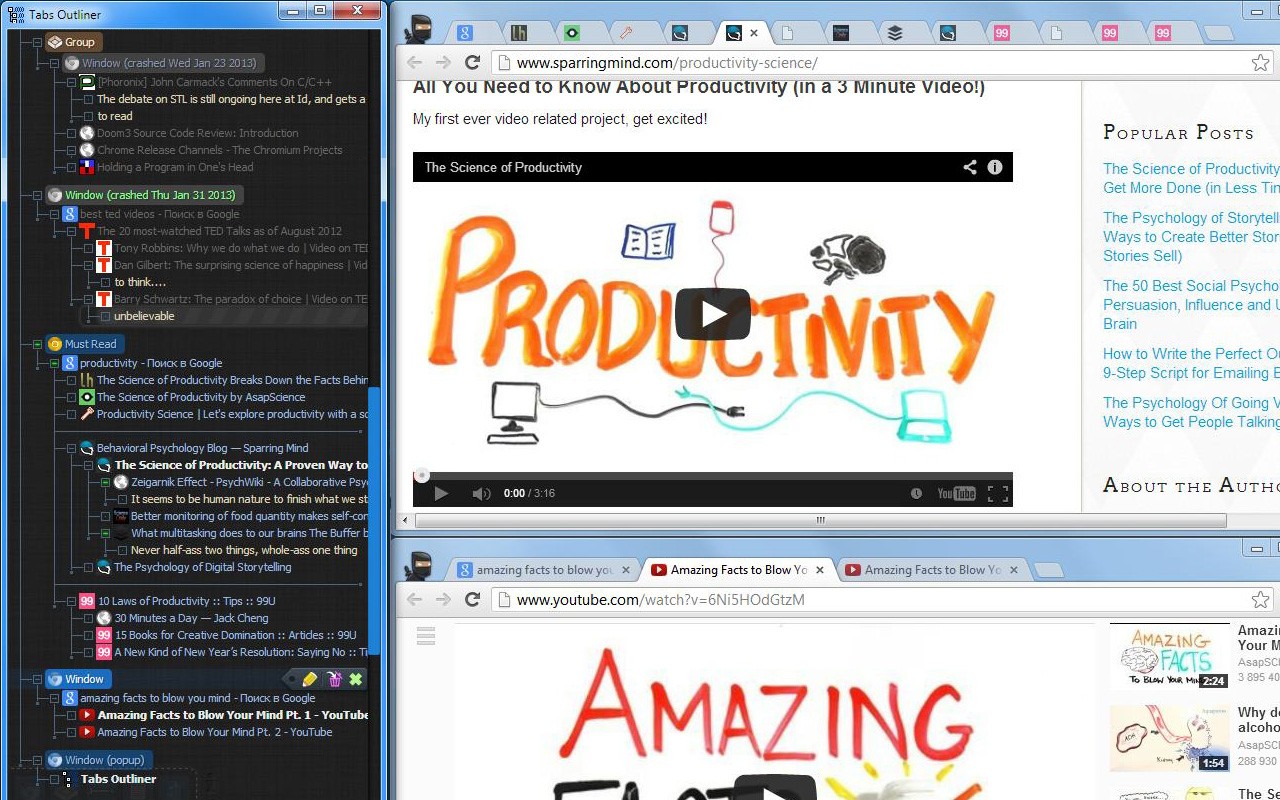
Tabs Outliner is a comprehensive browser extension that combines tab management, session management, and a tree-based personal information organizer into a single, cohesive tool. Its primary purpose is to help users cope with an excessive number of open tabs, a common problem for those who research extensively, work on multiple projects, or simply tend to keep many pages open for future reference. By allowing users to annotate and save tabs and windows within their original context, Tabs Outliner dramatically reduces the clutter of open tabs while preserving the structure and relationships between them. Unlike other tab managers that move saved tabs to a separate list, Tabs Outliner keeps saved and open items together in an interactive tree, enabling users to interact with saved tabs almost as if they were still open, but without consuming system resources.
Key Features
- Complete Overview: The extension provides a bird's-eye view of all open and saved tabs and windows, including any custom notes and marks you have added. This makes it easy to see your entire browsing workspace at a glance, helping you quickly locate items without scrolling through a long list of tabs.
- Flexible Tree Structure with Drag-and-Drop: Organize everything in a fully editable hierarchical tree. Unlike other tools, any node can be a parent to any other node, and items can be freely reordered to reflect priority or importance. This flexibility applies not only to saved links but also to currently open tabs and windows, allowing you to structure your browsing session in a way that matches your workflow.
- One-Click Close & Save: With a single click, you can save any tab or window 'in place' within its original context in the tree. Saved items can be freely mixed with open ones, and because the Tabs Outliner window is designed to be kept active for observing your workspace, saved items never fall out of focus-a common issue with tools that relegate saved tabs to separate lists. This makes closing tabs to free up resources feel safe and mentally effortless.
- Innovative Tabs Outlining & Organizing: Visually group nodes with separators, annotate windows and tabs, add comments, summarize main ideas, or create to-do lists. This feature transforms the extension into a personal knowledge base, enabling you to capture thoughts and notes directly within the context of your browsing sessions.
- Drag-and-Drop Text Notes: Text notes can be dragged and dropped directly from web pages or other programs into the tree. This allows you to easily capture snippets, quotes, or ideas without leaving your browser, making it a handy research tool.
- Tree-Style Tab Relations: Inspired by a famous Firefox extension, this feature automatically relates newly opened tabs to the tab they were opened from. This builds a strong visual context for all your items and perfectly maps out your browsing trail, making it easier to retrace your steps or understand the origin of a particular tab.
- Intelligent Crash Recovery Done Right: After a browser crash or sudden system restart, you no longer have to face the default Chrome 'all or nothing' choice-where you either lose all your tabs or reopen them all at once, potentially freezing your PC. Tabs Outliner lets you selectively reopen only the windows or individual tabs you need right now. Everything else remains safely saved in the exact context it was in before the crash, consuming zero resources until you are ready for it.
- Tabs List Exporter: Easily export and share an annotated list of your tabs via Google Docs, Word, Evernote, email, or messengers. Entire window hierarchies can be exported with a simple drag-and-drop, or you can save your entire tree as an HTML file (Ctrl+S in the main window). This is useful for sharing research with colleagues, creating reports, or simply archiving your work.
- One-Click Procrastination Stopper: Instantly close-save all open tabs and windows while preserving their full structure and context. This helps you regain system performance and mental clarity in seconds, allowing you to return to your work with a clean slate whenever you need a fresh start.
These features make Tabs Outliner a powerful solution for managing cognitive overload, particularly for individuals with ADHD or those who frequently experience information overload. By providing a visual and organized way to tuck away workflows without losing track of thoughts, it reduces mental load and anxiety. Additionally, it offers a reliable method to recover from crashed sessions, a common issue for power users who accumulate hundreds of open tabs. The extension is free to use with all the features described above, and optional paid features are available to support ongoing development, including keyboard shortcuts, frequent local backups, and automatic daily Google Drive backups. These paid features are optional, and the core application is highly effective without them. The tree constantly saves all changes locally, and manual backups or data exports can be done at any time for free. Recent updates have improved 'Continue where you left off' support, multi-monitor handling, post-hibernation UI stability, and Manifest V3 compatibility, ensuring a smooth experience on modern Chrome.
Extensions that do the same job
Matched by what these extensions actually do, not by store category, and sorted so the ones asking for the least access come first.
| Extension | Site access | Permissions | Users | Rating |
|---|---|---|---|---|
| Tabs Outliner — this page | Limited | 6 | 100K | 4.4★ |
| Toby: Tab Management Tool | Limited | 5 | 300K | 4.2★ |
| Genie - Extemp, Congress, Debate | Limited | 3 | 20K | 4.7★ |
| ChromeTabsPlus | Limited | 3 | 1K | 3.1★ |
| Todoist for Chrome: Planner & Calendar | Limited | 6 | 500K | 4.7★ |
| L.O.C | Limited | 5 | 300K | 4.3★ |
| Careerflow AI Job Application Tracker, ATS Resume Checker, Autofill & more | All sites | 3 | 200K | 4.4★ |
Want the same thing with less access? Genie - Extemp, Congress, Debate, ChromeTabsPlus, Todoist for Chrome: Planner & Calendar ask for fewer permissions than this one.
Store data last checked August 14, 2026.