
Hide My IP
Free browser extension that hides your IP address via encrypted proxy tunnels, unblocks websites, and protects privacy
What it does
Permissions and access
Taken from the extension's own manifest file inside the package. The store listing does not spell this out, so it is worth reading before you install.
| Permission | What it allows |
|---|---|
privacy | Change your privacy settings |
proxy | Route your traffic through a proxy |
storage | Store its own settings and data |
webRequest | Watch your network requests |
webRequestAuthProvider | webRequestAuthProvider |
Requests 5 permissions — extensions doing the same job average 7.0.
Technical details
Show all 25 languages
Description
Hide My IP is a free browser extension for Chrome and Firefox that conceals your real IP address by routing your internet traffic through an encrypted proxy tunnel. It allows you to unblock websites, bypass firewalls, and prevent ISPs, governments, or any third party from monitoring your online activity. The extension offers unlimited bandwidth with no advertisements, making it suitable for streaming content from services that may be restricted in your region.
Key Features
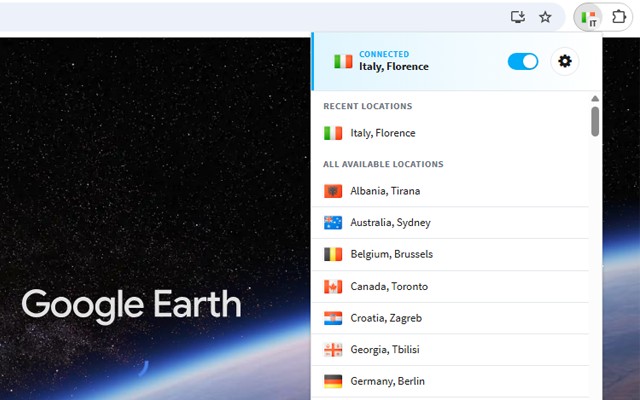
- IP Address Masking: When you activate the extension, your actual IP address is replaced with one from Hide My IP's global server network. This prevents websites, advertisers, and trackers from identifying your true location or device, which is particularly useful when accessing geo-blocked content or maintaining privacy on public Wi-Fi networks.
- Encrypted Proxy Tunnels: All data transmitted between your browser and the proxy server is encrypted, ensuring that your browsing activity remains confidential even on unsecured connections. This is essential for protecting sensitive information like login credentials or financial details when using open networks.
- IP Leak Prevention: The extension includes built-in mechanisms to prevent your real IP from being exposed through WebRTC, DNS requests, or other common leaks. This is critical for users in high-censorship countries like China, where advanced fingerprinting techniques may attempt to uncover your true identity.
- Global Server Locations: You can choose from a list of proxy servers located in different countries. This allows you to appear as if you are browsing from a specific region, enabling access to region-locked streaming libraries, news sites, or social media platforms that are otherwise unavailable in your area.
- No Registration Required: The extension works immediately upon installation without requiring you to create an account, provide a credit card, or submit any personal information. This lowers the barrier to entry for users who need quick anonymity without committing to a paid service.
- Unlimited Bandwidth and No Ads: Unlike many free VPNs or proxies that impose data caps or display intrusive advertisements, Hide My IP offers unrestricted data usage without any promotional interruptions. This makes it practical for heavy activities like streaming HD video, downloading files, or browsing multiple sites over extended periods.
To use the extension, simply install it from the Chrome Web Store or Firefox Add-ons page, click the Hide My IP icon in your browser toolbar, select a desired server location from the list, and you are instantly connected with a hidden IP and encrypted traffic. The entire process takes less than ten seconds and requires no technical expertise. Whether you need to bypass corporate firewalls, access blocked content while traveling, or simply protect your privacy from online surveillance, Hide My IP provides a straightforward and effective solution.
Extensions that do the same job
Matched by what these extensions actually do, not by store category, and sorted so the ones asking for the least access come first.
| Extension | Site access | Permissions | Users | Rating |
|---|---|---|---|---|
| Hide My IP — this page | All sites | 5 | 100K | 3.7★ |
| UltraSurf Security, Privacy & Freedom VPN | Limited | 5 | 900K | 4.6★ |
| BelkaVPN is VPN, Proxy to Unblock any sites | Limited | 8 | 5K | 3.3★ |
| Free VPN Proxy - 1VPN | All sites | 10 | 2M | 4.7★ |
| Free VPN For Chrome & Ad blocker - Planet VPN | All sites | 14 | 1M | 4.6★ |
| Free VPN Proxy - VPN for Chrome uVPN | All sites | 8 | 900K | 4.5★ |
| Turbo VPN - Secure Free VPN Proxy | All sites | 6 | 800K | 3.5★ |
Want the same thing with less access? UltraSurf Security, Privacy & Freedom VPN, BelkaVPN is VPN, Proxy to Unblock any sites, MEGA ask for fewer permissions than this one.
Store data last checked August 14, 2026.