
FeedSpotter
Detects RSS feeds on web pages and copies feed URL to clipboard with one click.
Description
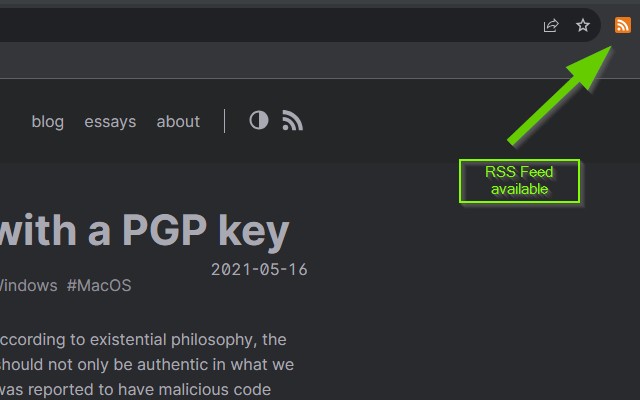
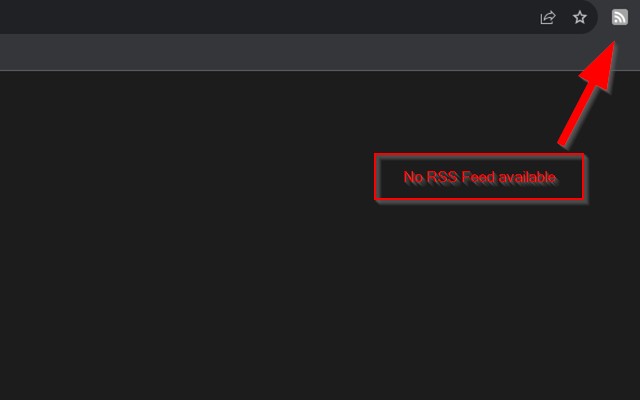
FeedSpotter is a Chrome extension that detects RSS feeds on web pages and provides quick access to them. In an era where many websites still support RSS but hide subscription links, FeedSpotter acts as a visual indicator and a one-click tool for feed discovery. When you browse a site that contains RSS feeds, the extension icon changes from grayscale to color, signaling the presence of feeds. Clicking the icon instantly copies the feed URL to your clipboard, allowing you to paste it into any RSS reader or service. This eliminates the need to manually inspect page source or search for obscure subscription buttons. FeedSpotter is particularly useful for users who follow multiple blogs, news outlets, or content platforms that offer RSS feeds but do not prominently display them. It streamlines the process of subscribing to updates, ensuring you never miss new content from your favorite sources. The extension is lightweight, does not clutter your browser, and works silently in the background. It supports all standard RSS and Atom feed formats commonly found on websites. Whether you are a seasoned RSS user or new to feed readers, FeedSpotter simplifies the discovery workflow. By providing instant feedback on feed availability and one-click copying, it saves time and reduces friction in staying informed. Use it to uncover feeds on sites you regularly visit, or explore new sites to find content streams you might otherwise overlook. FeedSpotter respects your privacy: it does not collect any personal data or browsing history, and it only reads the current page's metadata to detect feeds. There are no ads, no tracking, and no unnecessary permissions. The extension is designed for users who value efficient content consumption and want to keep their information pipeline organized. With FeedSpotter, you can quickly build and maintain a list of feeds for your preferred reader, all without manual URL extraction.
Features
- Automatic feed detection: When you visit a webpage, FeedSpotter scans the page's HTML for RSS or Atom feed links. If found, the toolbar icon becomes colored; otherwise it stays grayscale. This gives you instant visual feedback without any action required.
- One-click clipboard copy: Clicking the extension icon copies the first discovered feed URL directly to your clipboard. This works for any site with at least one feed link. You can then paste the URL into your RSS reader, such as Feedly, Inoreader, or The Old Reader, or into a podcast app that supports RSS.
- Supports multiple feeds: If a page contains several feeds (e.g., separate feeds for posts and comments, or categories), FeedSpotter copies the primary feed (usually the main content feed). For advanced users, you can right-click the icon to see a list of all detected feeds and choose which one to copy.
- Lightweight and unobtrusive: The extension uses minimal system resources and does not modify webpage content or add extra buttons. It runs only when you click the icon or when a page loads, ensuring no performance impact.
- Privacy-focused: FeedSpotter does not collect, store, or transmit any personal information. It only reads the current page's feed links when you visit it. No data is sent to external servers.
- Works on most websites: The extension detects standard feed link tags (
<link type="application/rss+xml">and<link type="application/atom+xml">) placed in the page head. It is compatible with blogs, news sites, podcast pages, and any site that implements these tags.
FeedSpotter is ideal for users who want to rediscover the value of RSS feeds without manual effort. It turns your browser into a proactive feed finder, making subscription as simple as a click. Whether you are curating news, following niche blogs, or managing podcast subscriptions, FeedSpotter helps you stay updated efficiently. Install it to transform your browsing into a seamless content discovery experience, and never miss an update from the sites you love.
Related


