
No YouTube Shorts
Hides all YouTube Shorts from the homepage, sidebar, search results, and channel pages.
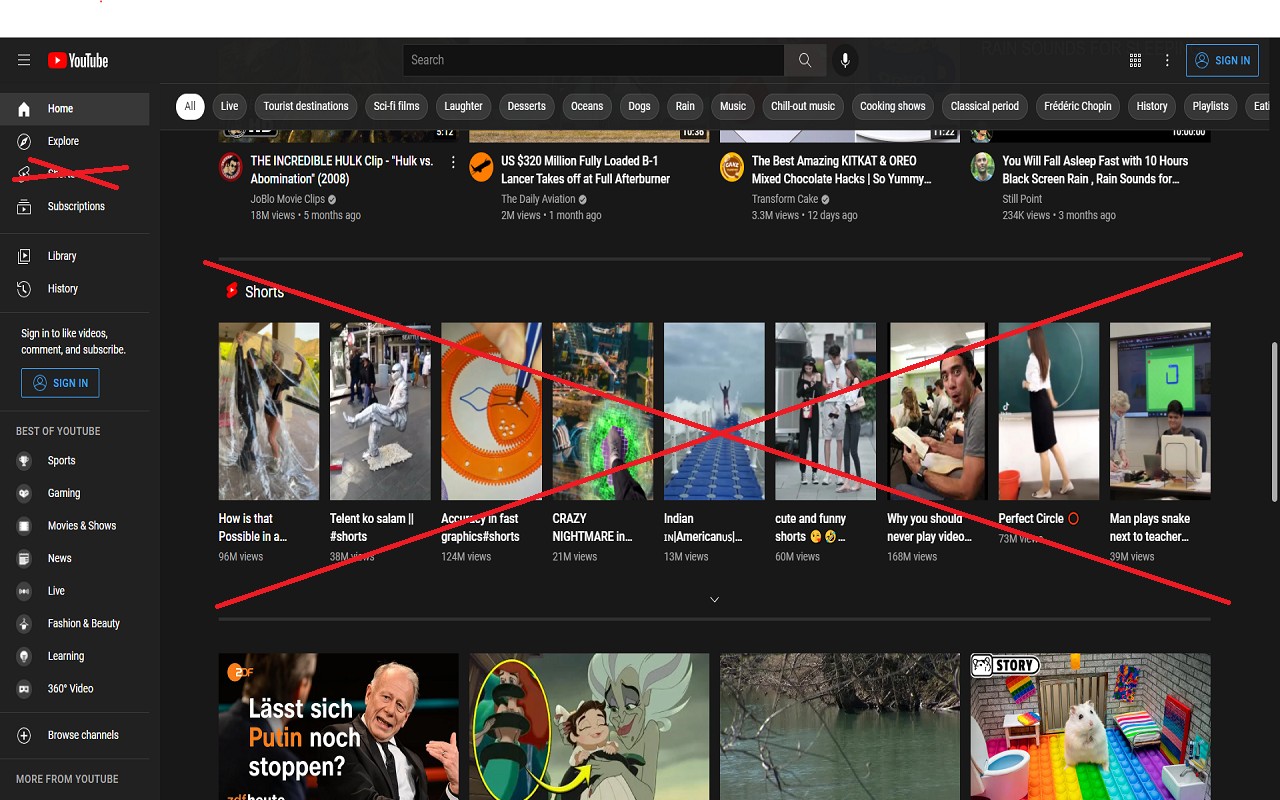
What it does
Permissions and access
Taken from the extension's own manifest file inside the package. The store listing does not spell this out, so it is worth reading before you install.
| Permission | What it allows |
|---|---|
declarativeContent | React to page content without reading it |
management | See and manage your other extensions |
storage | Store its own settings and data |
tabs | See the addresses and titles of your open tabs |
Technical details
Description
No YouTube Shorts is a lightweight browser extension that automatically hides all Shorts content from YouTube. If you find the Shorts feed distracting or simply prefer traditional long-form videos, this tool removes Shorts sections from the homepage, sidebar, search results, and other areas of the YouTube interface. It works silently in the background, requiring no manual configuration.
Features
- Removes Shorts from the homepage: The extension hides the Shorts shelf that appears on the YouTube main page, so you only see regular video recommendations.
- Cleans up the sidebar: Shorts links and previews in the left navigation panel are hidden, reducing clutter.
- Filters search results: When you search for videos, any Shorts results are removed, ensuring you only get standard video content.
- Works on channel pages: The Shorts tab and any Shorts previews on a channel page are hidden.
- Compatible with YouTube's latest design: The extension is regularly updated to work with YouTube's evolving interface. Version 0.6.6 includes adjustments for the newest YouTube layout.
- Lightweight and unobtrusive: The extension runs efficiently without slowing down your browser or affecting other YouTube features.
Whether you want to avoid the addictive short-form content or simply prefer a cleaner YouTube experience, No YouTube Shorts provides a straightforward solution. No extra settings or permissions are needed-just install and browse YouTube without Shorts. If you encounter any issues or have suggestions for improvement, the developer welcomes feedback.