
Distill Web Monitor
Monitors web pages and feeds for changes, sending alerts via email, SMS, and more.
What it does
Permissions and access
Taken from the extension's own manifest file inside the package. The store listing does not spell this out, so it is worth reading before you install.
| Permission | What it allows |
|---|---|
alarms | Schedule background tasks |
contextMenus | Add items to the right-click menu |
notifications | Show desktop notifications |
offscreen | Run hidden pages for background work |
scripting | Run its own code on pages |
storage | Store its own settings and data |
tabs | See the addresses and titles of your open tabs |
unlimitedStorage | Store unlimited data on your computer |
Requests 8 permissions — extensions doing the same job average 5.8.
Technical details
Show all 11 languages
Description
Distill Web Monitor is a browser extension that continuously checks web pages and RSS feeds for changes, alerting you via SMS or email the moment a modification is detected. It runs directly in your browser, allowing you to monitor any page without needing to install separate software. Whether you're tracking product availability, price drops, news updates, or any dynamic content, Distill provides a reliable way to stay informed in real time.
Key Features
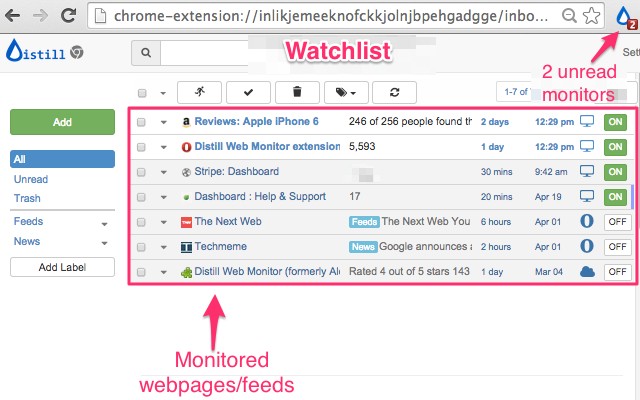
- Inbox-style Watchlist: Manage all your monitored pages in a central, organized interface that resembles an email inbox. Each monitor is displayed as a separate item, making it easy to review status, edit settings, or delete monitors.
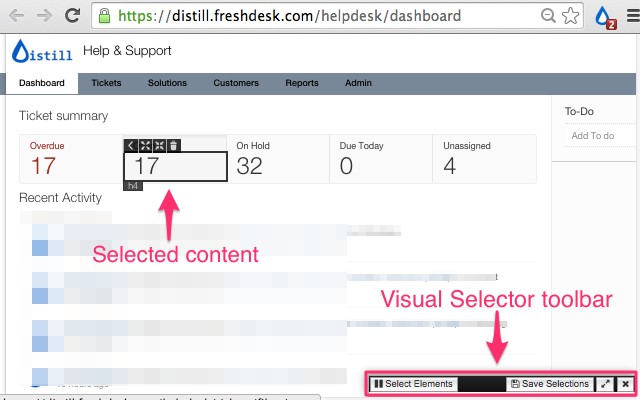
- Easy content selection: You can choose to monitor an entire page or select specific parts of it. To select specific content, simply click the Distill drop icon in your browser toolbar, choose "Select parts of page," and then hover over the desired elements. Click to highlight the areas you want to watch, and Distill will track changes only in those sections.
- Highlighted changes: When a change is detected, Distill visually highlights the altered content directly on the page, making it instantly clear what has been updated.
- Change history: Distill keeps a record of all detected changes over time. You can review past versions of the monitored content, which is useful for tracking trends or verifying the frequency of updates.
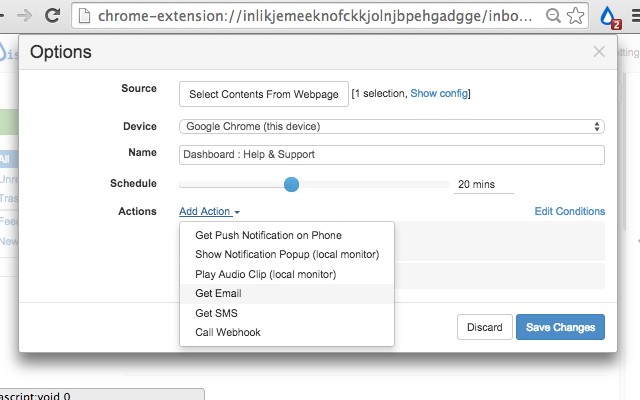
- Multiple alert actions: You can configure various notification methods for each monitor, including email, SMS, sound, pop-up alerts, push notifications on your phone, and integration with Slack and Discord via webhooks. Additionally, you can set up raw webhooks to trigger custom automations or connect with other services.
- Conditions for smart actions: Set specific conditions that must be met before an alert is triggered. For example, you can notify only when a price drops below a certain threshold or when a keyword appears in the change. This reduces noise and ensures you only receive relevant alerts.
- Powerful expression for content selection: For advanced users, Distill supports XPath, CSS, and JavaScript expressions to precisely define which content to monitor. You can also use regular expressions to extract specific matches from the page, such as numbers or patterns.
- Sync across devices: Your Watchlist is synchronized across all your devices on every plan, so you can manage your monitors from your desktop, laptop, or mobile device seamlessly.
To get started, open the webpage you wish to monitor, click the Distill drop icon in your browser toolbar, and choose whether to monitor the whole page or select specific parts. If you select parts, simply hover over the area you want to watch and click to select it. Save your selection, and Distill will begin checking for changes. You can view your Watchlist by clicking the Distill icon, where all your monitored pages are listed. For a detailed guide, refer to the help article at https://distill.io/docs/web-monitor/distill-chrome-extension/. If you need assistance, visit the forums at https://forums.distill.io/ or contact support via email at [email protected].
Extensions that do the same job
Matched by what these extensions actually do, not by store category, and sorted so the ones asking for the least access come first.
| Extension | Site access | Permissions | Users | Rating |
|---|---|---|---|---|
| Distill Web Monitor — this page | All sites | 8 | 400K | 4.5★ |
| Motorwatch - car price tracker | Limited | 1 | 7K | 4.8★ |
| CS2 Trader - Steam Trading Enhancer | Limited | 5 | 300K | 4.0★ |
| EverBee - Find Best Selling Products on Etsy | All sites | 3 | 200K | 4.7★ |
| Picodi.com Cashback | All sites | 4 | 80K | 4.0★ |
| OrderPro: Export Amazon, eBay, Walmart & More | Limited | 7 | 3K | 4.4★ |
| Yahoo Homepage | Limited | 5 | 400K | 3.7★ |
Want the same thing with less access? Motorwatch - car price tracker, CS2 Trader - Steam Trading Enhancer, EverBee - Find Best Selling Products on Etsy ask for fewer permissions than this one.
Store data last checked August 14, 2026.