
Popup Blocker (strict)
Blocks popups and popunders from any website, pausing requests for user action.
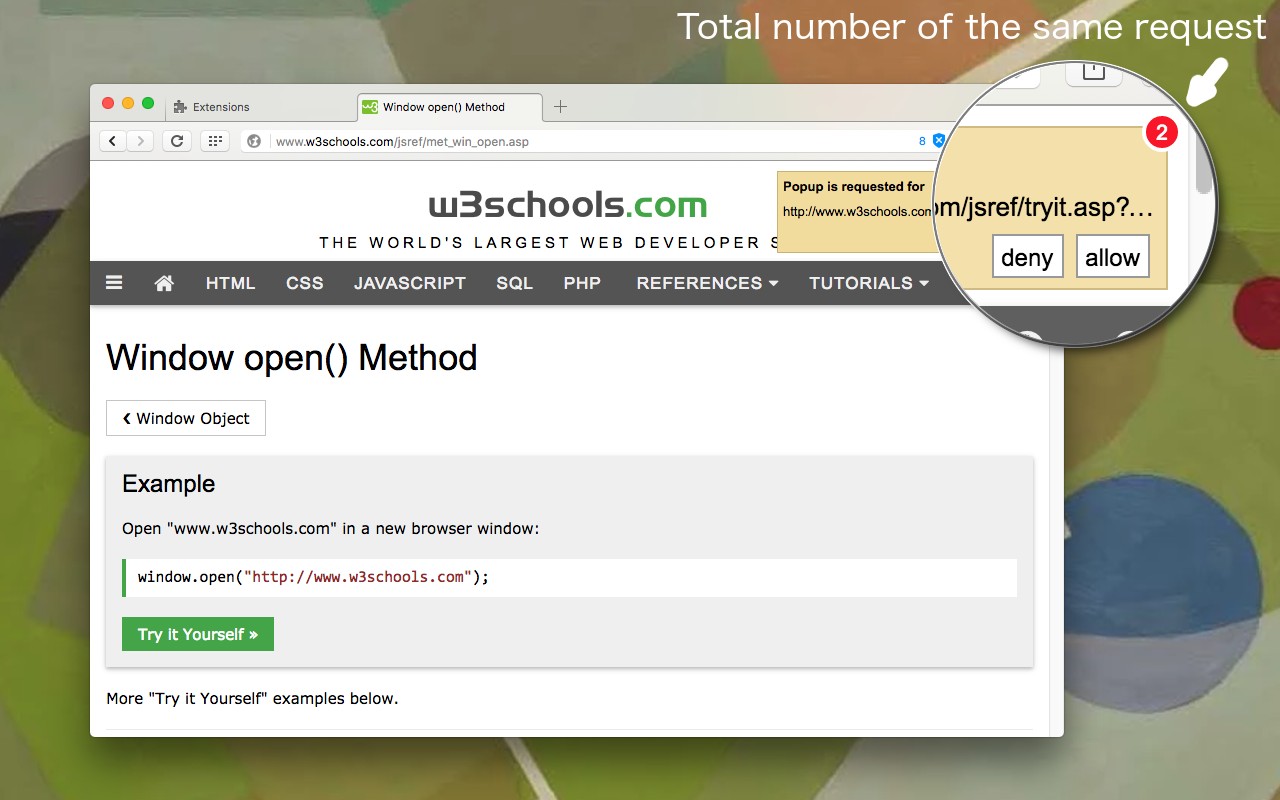
What it does
Permissions and access
Taken from the extension's own manifest file inside the package. The store listing does not spell this out, so it is worth reading before you install.
| Permission | What it allows |
|---|---|
scripting | Run its own code on pages |
storage | Store its own settings and data |
Requests 2 permissions — extensions doing the same job average 8.6.
Technical details
Show all 5 languages
Description
Popup Blocker (strict) is a free, open-source Chrome extension that prevents websites from opening unwanted popups and popunders. It intercepts popup requests before they are executed, pausing them for user review. Unlike many other popup blockers that close target pages after they open, this extension blocks the request at the source-the original page-so no new windows or tabs are created. This is particularly useful on streaming, shopping, and WordPress sites that frequently attempt to open advertisements or redirect users to other pages.
Key Features
- Blocks All Popup Types: The extension stops both popups (new windows) and popunders (windows that open behind the current one) using methods such as
window.open(),a[target=_blank]links, and form submissions. This ensures comprehensive protection against common popup triggers. - User Notification and Badge Count: When a popup is blocked, a notification appears at the top-right corner of the page. The extension's toolbar icon displays a badge counter that increments if multiple identical popup requests are made. This helps users understand how many popups were prevented.
- Action Options for Blocked Requests: For each blocked popup, users can choose to deny the request, allow it (opening the popup normally), open it in a background tab, or redirect the current page to the requested URL. This flexibility lets users access legitimate popups when needed.
- Automatic Decision Based on History: For previously visited sites, the extension remembers your past decisions (allow or deny) and automatically applies the same action. This reduces interruptions on trusted sites where you've already chosen to allow popups.
- Notification Muting: Users can mute all page notifications via the toolbar interface, or mute notifications for a single page. This is helpful when you don't want to be disturbed by repeated popup blocks on a specific site.
- Whitelist (Exception List): You can add a hostname to the whitelist to ignore page notifications entirely for that site. This is useful for websites where you regularly allow popups and don't need to see notifications each time.
- Keyboard Shortcuts: Customizable shortcuts can be configured at
chrome://extensions/shortcutsto quickly open the extension UI or deny the last popup request. This speeds up interaction for power users. - Hover for Details: Hovering your mouse over a notification pauses the counter so you can review the request. Additionally, the tooltip shows the full URL of the blocked popup when the displayed URL is truncated.
- Offline Operation: The extension works entirely offline with no server-side activities. All blocking logic runs locally in your browser, ensuring privacy and fast response.
Popup Blocker (strict) is a single-purpose extension focused solely on popup and popunder blocking. It does not block network requests, ads, or overlay popups like cookie consent messages. For a complete ad-blocking solution, the developer recommends using this extension alongside uBlock Origin. You can test your blocker's effectiveness at webbrowsertools.com/popup-blocker. For bug reports and FAQs, visit the project's GitHub page and official documentation.
Extensions that do the same job
Matched by what these extensions actually do, not by store category, and sorted so the ones asking for the least access come first.
| Extension | Site access | Permissions | Users | Rating |
|---|---|---|---|---|
| Popup Blocker (strict) — this page | All sites | 2 | 300K | 4.5★ |
| BetterTTV | Limited | 2 | 3M | 4.6★ |
| MovieClear - ad blocker RUTUBE | All sites | 2 | 20K | 4.6★ |
| AdGuard AdBlocker | All sites | 11 | 16M | 4.7★ |
| uBlock Origin Lite | All sites | 8 | 16M | 4.5★ |
| Malwarebytes Browser Guard | All sites | 13 | 11M | 3.9★ |
| Online Security | All sites | 18 | 10M | 3.6★ |
Want the same thing with less access? BetterTTV asks for fewer permissions than this one.
Store data last checked August 14, 2026.