
UltraBlock - Adblock & Privacy Protection
Blocks ads, trackers, and third-party cookies to protect privacy and speed up browsing.
What it does
Permissions and access
Taken from the extension's own manifest file inside the package. The store listing does not spell this out, so it is worth reading before you install.
| Permission | What it allows |
|---|---|
activeTab | Access the current tab when you click the extension |
browsingData | Clear your browsing data |
cookies | Read and change cookies for the sites it runs on |
declarativeNetRequest | Block or modify network requests |
declarativeNetRequestFeedback | declarativeNetRequestFeedback |
declarativeNetRequestWithHostAccess | Block or modify requests on sites it can access |
storage | Store its own settings and data |
tabs | See the addresses and titles of your open tabs |
webRequest | Watch your network requests |
Requests 9 permissions — extensions doing the same job average 6.9.
Technical details
Show all 4 languages
Keyboard shortcuts
| Shortcut | Action |
|---|---|
| Ctrl+Shift+U | Open UltraBlock |
Description
UltraBlock is a privacy-focused browser extension built on the Manifest V3 platform. It blocks advertisements, tracking scripts, and third-party cookies to enhance your online privacy and speed up page loading. After filtering out unwanted content, you see the same website but without the ads and invisible trackers that slow down your browsing experience. The extension targets retargeting ads, video ads, and hidden tracking services that monitor your behavior across the web. It can work alongside other privacy tools like AdBlock, Ghostery, or Privacy Badger for added protection.
Features
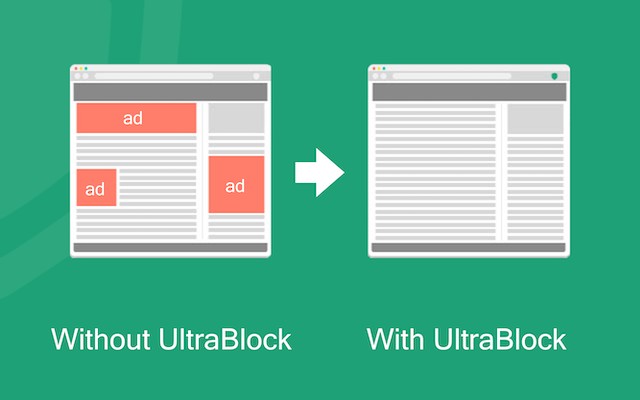
- Ad, Tracker, and Retargeting Script Removal: Automatically blocks ads, trackers, and retargeting scripts from loading on websites. This reduces clutter and prevents advertisers from following you across sites. Useful when you want a clean, distraction-free browsing experience without being tracked.
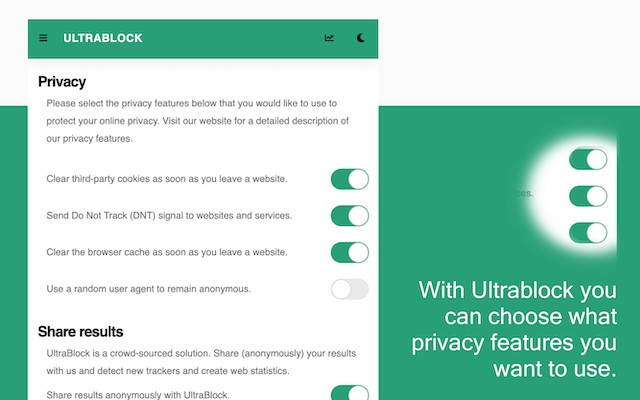
- Automatic Third-Party Cookie Deletion: Deletes third-party cookies after each visit to prevent cross-site tracking. This is particularly useful when you visit multiple sites and want to avoid being profiled based on your browsing history.
- Privacy and Online Identity Protection: Sends the Do Not Track header with every request and offers optional User-Agent rotation. This makes it harder for services to fingerprint your browser. Helps protect your identity when you are concerned about data collection.
- Page Load Speed Improvement: By blocking ads and trackers, pages load faster. The extension reports an average speed increase of over 73%. Beneficial for users on slow connections or when visiting ad-heavy sites.
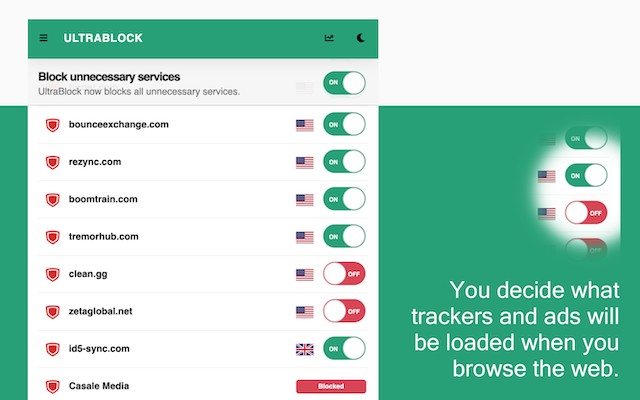
- Visibility into Background Services: The popup shows which services a site attempts to load, categorized as Advertising, Analytics, Social, or Essential. You can see exactly what is being blocked and where your data might be stored. Useful for understanding the privacy impact of a website.
- Manual Blocking or Allowing of Specific Services: From the popup, you can manually block or allow individual services. This gives you fine-grained control over your browsing experience. For example, you might allow a social widget on one site but block it on another.
- Data Location Information: The popup displays in which country your data is stored for each service. You can temporarily pause UltraBlock to see all external services and their data locations, then reactivate protection. Helps you make informed decisions about which services to trust.
- Ad and Tracker Intelligence Database: Maintains a manually verified database with over 5,400 hostnames, each categorized by type. Unnecessary services are blocked automatically, while essential ones remain active. Ensures that blocking does not break website functionality.
- Advanced Privacy Protection: Blocks over 80% of known ads and trackers, cleans third-party cookies and browser cache after each visit, and prevents cross-site tracking and behavioral profiling. This combination of automatic and manual protection makes it a comprehensive privacy tool.
- Lightweight and Fast: The extension runs efficiently in the background, improving page speed and reducing memory usage. You get a cleaner, safer, and faster web without extra effort. Suitable for everyday browsing without noticeable performance impact.
UltraBlock gives you full control to customize your browsing experience. Whether you want to block all trackers automatically or selectively allow certain services, the popup interface makes it easy. The extension is designed to be quiet and fast, providing robust privacy protection without slowing you down.
Extensions that do the same job
Matched by what these extensions actually do, not by store category, and sorted so the ones asking for the least access come first.
| Extension | Site access | Permissions | Users | Rating |
|---|---|---|---|---|
| UltraBlock - Adblock & Privacy Protection — this page | All sites | 9 | 10K | 4.2★ |
| Online Security | All sites | 18 | 10M | 3.6★ |
| DuckDuckGo Search & Tracker Protection | All sites | 11 | 3M | 4.2★ |
| Ghostery AdBlocker for Privacy | All sites | 13 | 2M | 4.7★ |
| Free VPN For Chrome & Ad blocker - Planet VPN | All sites | 14 | 1M | 4.6★ |
| AdGuard AdBlocker | All sites | 11 | 16M | 4.7★ |
| uBlock Origin Lite | All sites | 8 | 16M | 4.5★ |
Want the same thing with less access? BetterTTV, MEGA, Virtru Email Protection ask for fewer permissions than this one.
Store data last checked August 14, 2026.